📊 Elevate your calculations—because precision is the new power move.
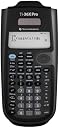
The Texas Instruments TI-36 X Pro is a professional-grade scientific calculator featuring a 3-line multi-display, built-in unit conversions, and a unique operation history that persists after shutdown. Ideal for engineering, science, and math professionals, it offers customizable function keys and a robust design trusted by millions worldwide.

| ASIN | B004NBZB2Y |
| Best Sellers Rank | #23,157 in Office Products ( See Top 100 in Office Products ) #41 in Scientific |
| Brand | Texas Instruments |
| Colour | Black |
| Customer Reviews | 4.5 4.5 out of 5 stars (21,880) |
| Date First Available | 6 August 2012 |
| Generic Name | Calculator |
| Imported By | Numerical Analytics Instruments Pvt Ltd Unit 409- South Ex Plaza-II, Masjid Moth, South Ex-II, New Delhi-110049 |
| Importer | Numerical Analytics Instruments Pvt Ltd Unit 409- South Ex Plaza-II, Masjid Moth, South Ex-II, New Delhi-110049 |
| Included Components | . Scientific Calculator |
| Item Dimensions LxWxH | 18.3 x 8.3 x 0.3 Centimeters |
| Item Weight | 115 g |
| Lines Per Page | 3 |
| Manufacturer | Texas Instruments |
| Manufacturer Part Number | 36PRO/TBL/1L1 |
| Material | Plastic |
| Model Number | 36PRO/TBL/1L1 |
| Net Quantity | 1 Count |
| Number of Items | 1 |
| Packer | Numerical Analytics Instruments Pvt Ltd Unit 409- South Ex Plaza-II, Masjid Moth, South Ex-II, New Delhi-110049 |
| Size | 9.7 Inch |
M**I
Go for It
Been using it for around a year. The product feels uncomfortable if you are a casio buff. But, the product is excellent, its just a matter of getting used to the keys and position of the various buttons. It does take some time getting used to but totally worth it. I have a two casios 991ms and fx72, but this is the best that I could get for the same price. Remember the function keys are silver and not easily discern able, so, you can use a nail polish or some kind of paint which goes into the grooves and the keys are highlighted. The cover is a little cumbersome to operate. But, it fits the bill for me an excellent product from TI and my first calculator was also a TI in the late 80s.
P**R
If you got the money don’t look elsewhere!
A beautiful calculator, smoothest experience compared to the ones I have used.(casio 991ES and the Fx 82ms) >>>The +plus es: It’s mainly targeted toward algebraic calculations. Calculations involving lots of 10powers(like eltronic charges) are easy with EE button. Log,ln, and custom multi tap one button and more importantly you can go to your operations history and find the value of any line at any moment, which is not possible with the casio. Greatly useful when you get an error, or you want to calculate with a new set of values. There’s also a ‘setop’ function that helps to do common operational patterns with the press of a button. For example if you’re working with problems that involve numerous area of circle calculations, you can simply save an operator as pi*r^2 into that button. It’ll operate on any value and give a result without having to type the whole line every time. Storing temp values to variables and using them are much easier with this. Built in convert to different measurement units sometimes come in real handy(it also has some built in popular universal constants too, like value of k etc. just in case) Most importantly display has more size and it becomes real easy when you’re doing lengthier step calculations. And yes turning off the calc doesn’t erase your history, that’s good if you take a break in between. >>>The -minus es: So far so good, but this has some limitations. Once you move out of the typicsl algebraic field things get a bit lengthier with this. For example general arithmetic problems could get more time consuming since the square and under-root are now clubbed into one button. You need to first place ‘2nd’ then the square root to do that operation. Matrix size is limited to 3X3 instead of Casio's 4X4. I shall update if I encounter further Conclusion: Overall I’m satisfied with the product. I’m a BTech graduate so a good calc was needed. i would pick this over 991EX or ES. My calculations time has greatly saved. The price could be a bit lowered I guess, but texas is a marked brand in this field so I’m not surprised to see what they’re asking for this product. Overall definitely recommended.
H**J
good one.
I have used 3-4 Casio calculators in past, this one is better than them in some aspect. it's light weight, has wide screen, three years warranty, more functions, better solar cell(at least that's how it appear), etc. the only issue is it's MRP is 1130 and 100rs is for delivery, in market you generally get 10-15%discount on such electronic products, so u will probably get it in 900-1000. but still a good buy from here.
S**K
Depends!
The product is working fine. However, after using this product, migrating to other calculators becomes little difficult. I used Casio fx991es plus, I lost it, hence bought this one for change. It never disappointed me unless for minor glitches. PROS: Conversion from complex to polar, and the other way round is easier compared to Casio FX991. Working with matrices is very easy and you will find it better to use this over Casio The calculator stores the last calculations more than 20, so you can can access them very easily. You can solve equations with ease, store values of variables and evaluate polynomials.(upto 3rd degree) Conversion from HEX to Binary, that is changing number bases is so simple. It makes it easier to access hyperbolic functions, believe me I was 5 times faster than my friends, who used Casios, in my class. Cons: You need to hold 2nd button(like shift in Casio) for some simple square root calculations, exponent functions and for using the answer. There are two buttons CLEAR and DELETE it is often confusing to use them, clear is more intensive, it wipes out entire equation which you are typing and delete is little intensive it will remove only one character. Beginners may take time to adjust. There are two minus signs, one is to be used to start a equation or number with "-" and other to use in remaining calculations. The first minus key is also assigned with the answer key , hence you need to use 2nd button for accessing answer every-time. AND Editing the equations is very hard, here Casio wins. Once you type the equation editing is not easy unless the character has same no.of spaces to fill, adding brackets while editing the previous equation will slow you down.
H**D
best in scientific calculator
it is equivalent to casio 991 ES and 991 EX except a few feature. both - and (-) minus sign may confuse you. first sign is used in term sepatation but can not be put before first term and can be used to minus something from answer or last entry and on the other hand second sign is used for sin of negative angle, for negative element of matrix, negative exponent and so on.A single key but can handle many function by multiple pressing for examle sin, sin-1, sinh, sinh-1. It is only oprated by battery (with life about one year) not solar. it can work as exel of 3 coulumn upto 48 row to make table and very fast to calculate all statistical variable at one time. It is not easy to operate first time. Watch some vedio on you tube to operate it. If you find any difficulty in any operation or funtion see manual also.
R**J
The TI-36X Pro is hands-down one of the best non-graphing calculators out there. I’ve been using it for engineering coursework, and it handles complex math, statistics, and scientific functions like a champ. The display is super clear, and I love the multi-line screen that lets you see inputs and results at the same time — way better than older models. It's intuitive once you get used to the layout, and the functionality is top-notch for everything from calculus to matrix operations. Also love that it’s permitted in exams where graphing calculators aren’t allowed — huge bonus! Solid build, sleek design, and definitely worth the investment if you're in any technical field.
K**S
I am a 3rd-year Engineering student, and this calculator has become my goto calculator for exams. I own at least 7 or 8 scientific calculators (lost count now), and 3 graphing calculators: these include the HP 50G Graphing calculator, the Sharp EL-516 and I have also used the Casio 115/991ES in the past (same calculator, just different branding between the US and Canada). The Sharp and Casio calculators are the most direct comparisons, while graphing calculators are obviously usually seen in a separate league. I won't compare this to TI's other scientific calculators, because this is simply the most powerful scientific calculator that TI makes. PROS compared to Sharp/Casio's most advanced scientific calculators: 1) Multiline display, and the interface actually uses the multi-lines. If you look at the Casios and Sharps, they use the mult-lines for displaying fractions and the last answer, but never display more than the last answer. In comparison, this TI-36X Pro uses all four lines, so that the last three answers/equations can all be displayed. It's much more like a graphing calculator in this respect. 2) One single mode for all functions; no need to switch between complex mode, normal mode, polynomial mode etc., like the Sharp and Casios do. It's merely for historic reasons that the Casios and Sharps still do this, and it makes so much more sense to have everything done in one mode (like a graphing calculator). 3) Solid, tactile buttons that have a slight "click" when you push them. I really like this, because I don't even need to be looking at the keys to know whether my keypress has registered or not. I find with the Casios and Sharps (particularly the Sharps) that they have keys that are really easily depressed, and don't give you great feedback on whether they've been clicked. 4) Really, really good interface. If you have ever used a graphing calculator from TI, you will feel right at home. The matrix equations, polynomial solver and and linear equation solver all have graphing calculator-like input, which should be both very familiar to many users, as well as intuitive for those new to TI UI design. For example, the polynomial solver is like a computer wizard, taking you through the steps for entering the coefficients of your equation. Really easy to use. 5) Cycling through functions with a single button is pretty innovative, and I think faster than using the 2nd function or (even worse) relying on entering another mode or menu. For example, in order to access ASIN, you just hit the SIN/ASIN button twice to cycle to ASIN. It's really easy and doesn't require you to use two separate buttons. 6) Really good definite integration and derivation. It works really well, and is faster than my Sharp (I performed a side-by-side comparison multiple times for speed). CONS 1) The intuitive interface comes at the expense of a few more button clicks in a few situations. For example, the polynomial solver is dummy-proof for entering your coefficients, but I generally feel that the Casio and Sharp calculators can accomplish the same thing with 1-2 less clicks occasionally. 2) Variables (other than 'x') are difficult to access. The variables are all stored under one button, which you cycle through. 'x' is easy to access since it is the first variable, but to access 'z', you need three button clicks. To access 'b' requires 6 button clicks. I would have preferred an alpha key for access keyboard variables, or a menu with number shortcuts. 3) The silver buttons and silver rocker colour are poor. I know that many other reviews have complained about this too, and it is a bit annoying. It definitely doesn't make the calculator unusable or anything, but they are a bit hard to read, and I personally also feel that they look out-of-place on a calculator that otherwise has rather dull (and more professional) colours. 4) This is a personal pet peeve, but above the "enter" button on the button-right, the TI-36X Pro has a Decimal/Fraction conversion button instead of the "multiplication" operator button; instead, the operator buttons have all been shifted up by one. TI has many other calculators, and most of them have the operator buttons right above the Enter key... which makes sense to me, since they are frequently used. I would have preferred to have the Decimal/Fraction conversion button above the operator keys, to make this keyboard more standard in comparison to other TI and HP calculator layouts. I sometimes hit the conversion key instead of the "addition" operator key as I am used to from other calculators (as a side-note, TI and HP prefer the single-column 1x4 layout of operator keys, whereas Casio and Sharp prefer the 2x2 layout of operator keys. You can easily adjust to either, although I personally prefer the TI/HP layout, as it's easier to access single-handed I think). PROS to graphing calculators What really pushes this calculator over-the-edge for me is that it feels like a graphing calculator in many respects; the interface is intuitive, the line display maximizes all your command history... and it does this while focussing on the main features you might need, such as matrix calculations or solving polynomial expressions. Obviously this can't do graphing, since it isn't a graphing calculator, but it does have a "function table" where you can enter a function and it automatically gives you the y values for an interval of x. That allows you to quickly plot a function's general curve on paper using the provided xy points. Very useful, and for this I have been able to stop needing a graphing calculator. Not only are graphing calculators not allowed on many exams, but some of the more advanced functions on graphing calculators (ie. matrixes) actually require fewer button presses to do on the TI-36X Pro. And I'm tired of changing batteries on a graphing calculator. In other words, I can actually accomplish stuff faster and more reliably on the TI-36X Pro. Honestly, this is a fabulous calculator. The Casio and Sharp calculators have been around far longer, so that's why you may hear some older users advocating for them, but the TI-36X Pro embraces a more intuitive UI with single-mode operation, and packs a few graphing calculator features which cover 99% of everything I do on a calculator in Engineering. I highly recommend this calculator for anyone in need of the most powerful scientific calculator on the market, or a graphing calculator user who finds that they don't need all that functionality and just want something a bit lighter to carry with them.
I**I
Elle fait très bien le boulot
O**Z
Esta es la primera calculadora de Texas Instruments que pruebo después de toda la vida utilizar Casio y tenía algo de miedo de que no me fuera a acostumbrar a la distribución de las teclas o funciones pero la verdad fue una transición muy sencilla y estoy mucho más a gusto con ella. Este modelo es perfecto desde prepa hasta universidad, resuelve ecuaciones, derivadas, integrales, matrices y cálculos estadísticos, es muy completa, equivalente a una 991 de Casio. Comparación Casio Vs TI Ventajas • Historial, tanto resultados como operaciones que se guarda incluso después de apagarla, esto es la cosa más útil que he visto para problemas en los que tienes que hacer varios pasos, es muy cómodo tenerlos anotados en la misma calcu y volver a escribirlos con una tecla, para mí esto fue lo más decisivo para probarla • Teclas muy intuitivas: la distribución se ve rara al inicio pero sólo es agarrarle, por ejemplo la tecla que tiene Pi le das una vez y poner Pi, otra vez y es e, una vez más y es i, se me hace más rápido y menos complicado que el shift + tecla de las Casio. Contras: • El menos no funciona como signo negativo, son 2 teclas diferentes, al inicio se te puede ir y que no salga una operación por lo mismo • Si quieres notación científica tienes que ponerlo en la configuración, no hay una opción intermedia de que a partir de tantos decimales se ponga en automático, entonces me ha pasado algunas operaciones que el resultado es por ejemplo 1.6393627x10^-8 y si no activo notación científica me lo muestra como 0.000000001, entonces esto es un poquito molesto, pero es rápido cambiar la configuración y ya que la operación se guarda en el historial no es algo tan malo.
A**Z
Good
Trustpilot
2 weeks ago
2 months ago