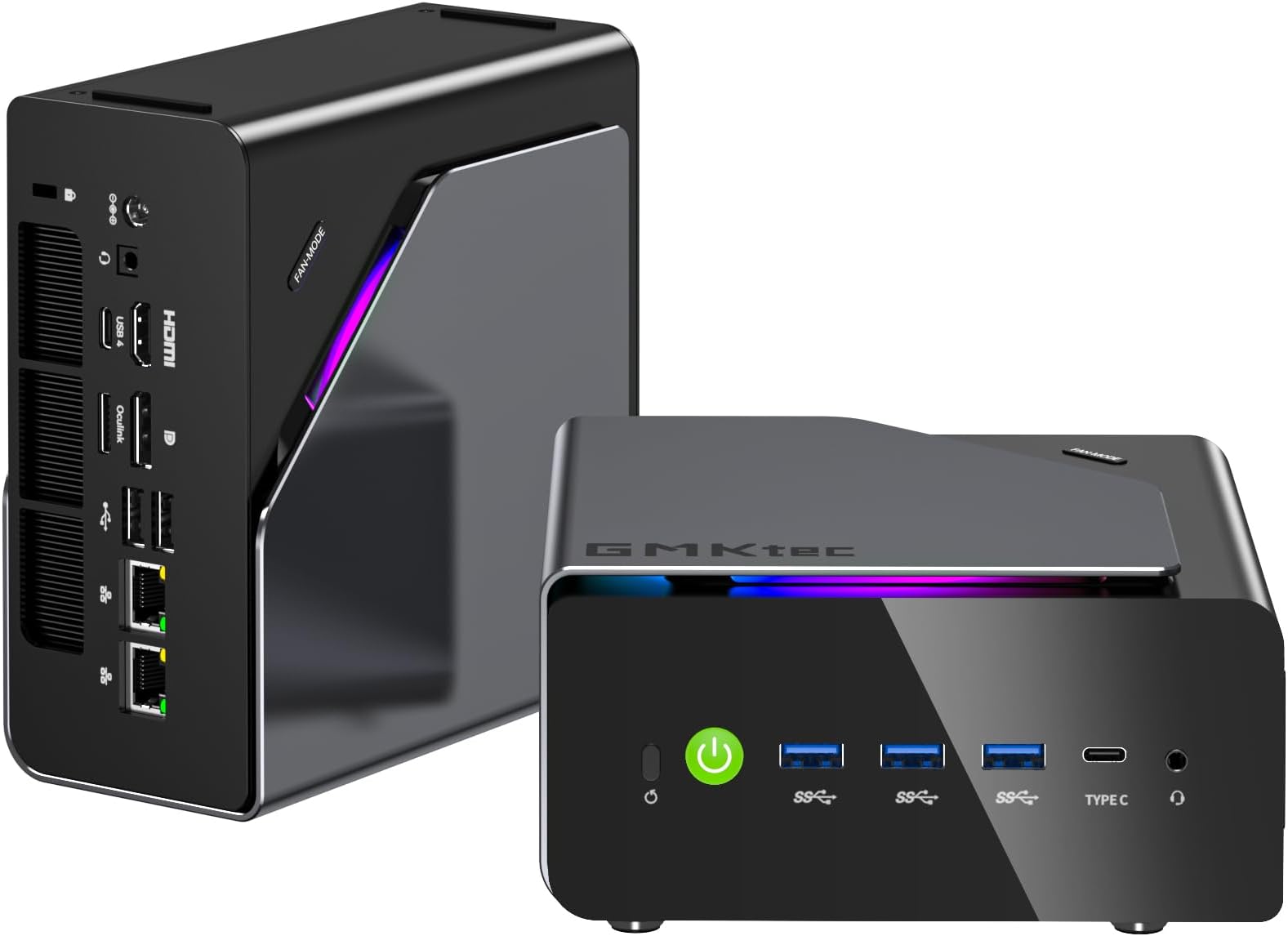
Desertcart purchases this item on your behalf and handles shipping, customs, and support to Portugal.
Product Description GMKtec K15 AI PC Intel Core Ultra 5 125U (Turbo 4.3GHz, 12C/14T) 32GB DDR5+1TB GMKtec Mini Pc Upgraded Model with Oculink Port, Larger Cooling Fans and Quad Display Support! GMKtec K15 Intel Core Ultra 5 125U Specification Premium Mini PC Computers Built for You M3 Ultra 16+1TB G10 16+1TB M6 Ultra 16+512 M8 16+1T M5 Ultra 32+512 K11 64+1TB M7 Ultra 32+512 Review: Great networking capability and for all-round office / server / video streaming use. - I have been using the GMKtec G11 mini PC with 16GB of RAM (2 × 8GB DDR4 2666 MHz) and a 512GB PCIe NVMe SSD, which I purchased for £359.96. The G11 mini PC comes well packaged, along with an HDMI cable, a screen mounting bracket, the power supply/cable, a user manual and a warranty card. The device is compact with a professional look, and is made out of plastic which provides a solid structure. It is ideal if you're looking to reduce clutter or need a computer that can be tucked away behind a monitor. Despite the compact size, GMKtec has managed to include plenty of connectivity, including dual HDMI outputs, USB-C, multiple USB ports, Wi-Fi 6E, Bluetooth 5.2, and even dual 2.5Gb Ethernet ports. That's more networking flexibility than you'll find on most PC’s, and allows for various network and data transfer setups. I like how they cover up the network ports initially, and advise that it is quicker to get into Windows if you start without an internet connection (Windows can take a long time looking for updates during the initial setup process otherwise). The Windows 11 Pro installation is very good, without any noticeable unnecessary add-ons making it a clutter free experience. For day-to-day use, the G11 feels good for use with most productivity apps such as Microsoft Office, browsing the internet and video streaming. With it’s power efficient AMD Ryzen R2514 four core, eight thread processor Windows boots quickly, which is also thanks to the 512GB NVMe (3.0 x4) SSD – which has a heat sink attached to keep temperatures down and performance up. Having the memory configured in dual-channel mode will also definitely help, especially when running multiple browser tabs, Office applications, and streaming services at the same time. Having RAM in dual channel helps to boost performance slightly and 16GB is sufficient for the majority of applications that this device is capable of running. The AMD Ryzen Embedded processor (R2514) isn't designed to compete with high-end gaming or workstation CPUs, but that's not really the point of this machine. For web browsing, media playback, office work, home automation, light server duties, and general productivity, it has more than enough performance. It handles 4K video playback without any issues and it would be a good option for using an android emulator such as the MSI app player for playing light android games. The G11 comes apart relatively easily, by prying off the top cover, which will reveal the M.2 SSD (with a spare M.2 SSD slot), the two sticks of RAM, and the Wifi/Bluetooth module. To take it apart further, you will need to unscrew and remove the SSD, then lift out the plastic cover, and then unscrew the two screws in the centre. I’d also then recommend unscrewing the Wifi module before progressing further. Then you will need to slightly bend the plastic sides as you pull the internal electronics out of the case (this can be tricky so do this carefully so nothing is damaged). You will find the large cooling fan and heatsink on the back side of the PCB/motherboard. There is room for upgrading your SSD or adding an additional M.2 PCIe 3.0 SSD, and upgrading the size of the RAM if needed. With the spare M.2 PCIe slot, this potentially could be configured with an Oculink adapter to allow larger PCIe devices to be connected. I haven’t tried this with this machine, but it is a potential option. I wouldn’t recommend considering a high power Oculink GPU as the processor would likely not provide sufficient performance to match a high end graphics card. Noise levels are incredibly low, with the internal components running cool due to their low energy use and large cooler. During normal use the fan is barely noticeable, and even when the system is working harder it remains far quieter than many (if not all) higher powered PC’s. Overall, the GMKtec G11 feels like a well-rounded budget mini PC that focuses on practicality rather than chasing benchmark numbers. If you need a compact, power-efficient computer for everyday tasks, networking, home office work, media streaming, or even light home-lab projects, it delivers a lot of capability in a very small package. I think that the full price of £359.96 might feel quite high when considering the CPU’s processing strength, but understandable considering the current RAM pricing crisis, and if looking for the capability that two 2.5Gb ethernet brings then this represents excellent value for money (and especially when a voucher or discount is available on the desertcart listing bringing the price down further 🙂). Review: Great as a simple desktop PC running Linux - Very happy so far. I've installed Linux (Mint) on it and just use it as a general PC for web, email, video calls, music and YouTube and it's been absolutely fine. It's very quiet and boots extremely quickly with the latest version of Linux Mint. No installation issues. I just booted from a USB stick and installed it that way. I've connected a generic Bluetooth mouse/keyboard and two 27" monitors with no compatibility issues. WiFi is dual band (2.4 & 5 GHz). I got the 12GB RAM and 256GB SSD version, which is plenty of memory and storage for my requirements. It came with Windows 11 pre-installed but I removed that. If you are wanting to use it for gaming, I suspect this version would not be powerful enough.


| ASIN | B0GGGXNZ6R |
| Best Sellers Rank | 54,580 in Computers & Accessories ( See Top 100 in Computers & Accessories ) 472 in External Hard Drives |
| Box Contents | 1* Adaptateur secteur et cable, 1* Manuel d'utilisation, 1* Mini PC NucBox K15 |
| Brand | GMKtec |
| Brand Name | GMKtec |
| CPU Model Number | Intel Core Ultra 5 125U |
| CPU model | Mobile CPU |
| CPU speed | 4.3 GHz |
| Cache Memory Installed Size | 1 TB |
| Cache size | 1 TB |
| Country of Origin | China |
| Customer Reviews | 4.5 out of 5 stars 847 Reviews |
| Display Type | External Display (LED/LCD/OLED) |
| Graphics Coprocessor | Integrated |
| Graphics Description | Integrated |
| Graphics card description | Integrated |
| Hard Disk Description | SSD |
| Hard Disk Interface | PCIE x 16 |
| Hardware Interface | PCI Express x16 |
| Human Interface Types | Keyboard, Mouse |
| Keyboard Layout | QWERTY |
| Manufacturer | GMKtec |
| Maximum Display Resolution | 3840 Pixels |
| Memory Clock Speed | 4800 MHz |
| Memory Speed | 4800 MHz |
| Memory Storage Capacity | 1 TB |
| Model Name | Nucbox K15 |
| Model Number | Nucbox K15 |
| Native Resolution | 7680 x 4320 |
| Network Connectivity Technology | Ethernet, HDMI, LAN, USB |
| Operating Systems | OS |
| Operating system | OS |
| Personal Computer Design Type | Mini PC |
| Processor Brand | Intel |
| Processor Count | 1 |
| Processor Series | Mobile CPU |
| Processor Socket | FCBGA2049 |
| Processor Speed | 4.3 GHz |
| Product Warranty | 3-year limited warranty (one-year replacement, two-year repair) |
| RAM Memory Installed | 32 GB |
| RAM Memory Technology | DDR5 |
| RAM Type | DDR5 RAM |
| Ram Memory Maximum Size | 32 GB |
| Resolution | 3840 x 2160 |
| Total Video Out Ports | 4 |
| Unit Count | 1.0 count |
| Video Output | HDMI 2.1, DisplayPort 1.4 |
| Video Output Interface | HDMI 2.1, DisplayPort 1.4 |
M**3
Great networking capability and for all-round office / server / video streaming use.
I have been using the GMKtec G11 mini PC with 16GB of RAM (2 × 8GB DDR4 2666 MHz) and a 512GB PCIe NVMe SSD, which I purchased for £359.96. The G11 mini PC comes well packaged, along with an HDMI cable, a screen mounting bracket, the power supply/cable, a user manual and a warranty card. The device is compact with a professional look, and is made out of plastic which provides a solid structure. It is ideal if you're looking to reduce clutter or need a computer that can be tucked away behind a monitor. Despite the compact size, GMKtec has managed to include plenty of connectivity, including dual HDMI outputs, USB-C, multiple USB ports, Wi-Fi 6E, Bluetooth 5.2, and even dual 2.5Gb Ethernet ports. That's more networking flexibility than you'll find on most PC’s, and allows for various network and data transfer setups. I like how they cover up the network ports initially, and advise that it is quicker to get into Windows if you start without an internet connection (Windows can take a long time looking for updates during the initial setup process otherwise). The Windows 11 Pro installation is very good, without any noticeable unnecessary add-ons making it a clutter free experience. For day-to-day use, the G11 feels good for use with most productivity apps such as Microsoft Office, browsing the internet and video streaming. With it’s power efficient AMD Ryzen R2514 four core, eight thread processor Windows boots quickly, which is also thanks to the 512GB NVMe (3.0 x4) SSD – which has a heat sink attached to keep temperatures down and performance up. Having the memory configured in dual-channel mode will also definitely help, especially when running multiple browser tabs, Office applications, and streaming services at the same time. Having RAM in dual channel helps to boost performance slightly and 16GB is sufficient for the majority of applications that this device is capable of running. The AMD Ryzen Embedded processor (R2514) isn't designed to compete with high-end gaming or workstation CPUs, but that's not really the point of this machine. For web browsing, media playback, office work, home automation, light server duties, and general productivity, it has more than enough performance. It handles 4K video playback without any issues and it would be a good option for using an android emulator such as the MSI app player for playing light android games. The G11 comes apart relatively easily, by prying off the top cover, which will reveal the M.2 SSD (with a spare M.2 SSD slot), the two sticks of RAM, and the Wifi/Bluetooth module. To take it apart further, you will need to unscrew and remove the SSD, then lift out the plastic cover, and then unscrew the two screws in the centre. I’d also then recommend unscrewing the Wifi module before progressing further. Then you will need to slightly bend the plastic sides as you pull the internal electronics out of the case (this can be tricky so do this carefully so nothing is damaged). You will find the large cooling fan and heatsink on the back side of the PCB/motherboard. There is room for upgrading your SSD or adding an additional M.2 PCIe 3.0 SSD, and upgrading the size of the RAM if needed. With the spare M.2 PCIe slot, this potentially could be configured with an Oculink adapter to allow larger PCIe devices to be connected. I haven’t tried this with this machine, but it is a potential option. I wouldn’t recommend considering a high power Oculink GPU as the processor would likely not provide sufficient performance to match a high end graphics card. Noise levels are incredibly low, with the internal components running cool due to their low energy use and large cooler. During normal use the fan is barely noticeable, and even when the system is working harder it remains far quieter than many (if not all) higher powered PC’s. Overall, the GMKtec G11 feels like a well-rounded budget mini PC that focuses on practicality rather than chasing benchmark numbers. If you need a compact, power-efficient computer for everyday tasks, networking, home office work, media streaming, or even light home-lab projects, it delivers a lot of capability in a very small package. I think that the full price of £359.96 might feel quite high when considering the CPU’s processing strength, but understandable considering the current RAM pricing crisis, and if looking for the capability that two 2.5Gb ethernet brings then this represents excellent value for money (and especially when a voucher or discount is available on the Amazon listing bringing the price down further 🙂).
J**S
Great as a simple desktop PC running Linux
Very happy so far. I've installed Linux (Mint) on it and just use it as a general PC for web, email, video calls, music and YouTube and it's been absolutely fine. It's very quiet and boots extremely quickly with the latest version of Linux Mint. No installation issues. I just booted from a USB stick and installed it that way. I've connected a generic Bluetooth mouse/keyboard and two 27" monitors with no compatibility issues. WiFi is dual band (2.4 & 5 GHz). I got the 12GB RAM and 256GB SSD version, which is plenty of memory and storage for my requirements. It came with Windows 11 pre-installed but I removed that. If you are wanting to use it for gaming, I suspect this version would not be powerful enough.
M**A
Cheap, cheerful, does the job
Just needed a basic pc for some admin and so far so good. Great but for a cheap office or business pc .
B**Y
Good PC - with some limitations
The Good: Great Little PC that booted and setup really easily. Low bloatware Windows 11 Pro installed and simple PC tasks are quick. The Limitations: Wanted to run Debian and Proxmox on an extra partition and dual boot to run Home Assistant in a VM. Proxmox does not support the Realtek network card in the PC. So I bought an extra nVME ssd and installed Home Assistant OS instead - all works well now after a Home Assistant restore.
M**W
Tiny, powerful
Bought to replace a larger-format Fujitsu PC, for media centre duties and serving data from a USB drive. Nice packaging, comes with a UK power adapter - the power input is USB-C so presumably you could use other power sources, provided they can deliver 12V at 3A. I sized the installed Windows partition down to minimal required, in case I want to use it later, then installed Linux Mint. This went relatively smoothly, once I had figured out how to force the BIOS to boot from the Linux partition by default. The G5 runs fairly cool and has plenty of power for what I'm doing with it. Recommended.
C**F
Bigger than other Mini PCs I've bought, but that's not a bad thing
I bought this device to run my CCTV NVR software (Blue Iris) as my old unit (based around an i5 10500) was no longer up to the job with the advent of built in AI. I have 10 cameras and 18 streams coming through the PC (all 2k, 4MP, 15fps) and this device handles it all very well; the CPU load typically sits at around 20-25% but will spike to about 35% on an alert. The 2 NICs handle the network traffic very easily too. There are two case fans (which are whisper quiet) that keep the system running at about 52-57C in a poorly ventilated room; the larger that normal case size helps keeps the air flowing and the thermals in check, which makes me very happy. The unit is really well made and has a bit of a tank feel to it. I opened it up to add another nvme disk and was pleasantly surprised by how well it was all laid out. The 3 year warranty is reassuring and on first impressions, I doubt that it will be called on. I had reason to contact GMKtec support with a driver query and they responded in good time and were very helpful. All in all, this has been a very positive experience for me. I nabbed a £200 off voucher for this when it came up, so it was even better value for money for me.
M**T
Small but perfectly formed
Bought this to run a small Minecraft server, which it does just fine, but out of curiosity I tried using it as a regular PC for a while and it's surprisingly capable - web browsing, word processing, streaming video, etc., all work perfectly, and it even managed to run some older games (Skyrim and GTA V) without too much bother. Fan is almost silent, and even under full load you're unlikely to hear it. Its size is a blessing and a curse - it's small enough to tuck out of the way, but it's so light that it gets dragged around by the weight of the cables.
J**Y
Random disconnecting from monitor
Randomly disconnected from monitor, no loss of task just no connection then reconnected
C**R
NucBox G5 - An Incredibly Compact Powerhouse of a Mini PC
The NucBox G5 is a remarkable feat of engineering, fitting a very capable processor and lots of ports into an incredibly tiny package that will fit anywhere, or that you could easily take with you in a bag (more on that below). As an existing owner of the NucBox G3, the G5's baby(?) brother (G3 = lesser power, bigger size), I was already impressed with what GMKTec has been able to do with a mini-PC, but the G5 blows that out of the water. Size Comparison with NucBox G3: The NucBox G5 is remarkably compact, measuring just 72 x 72 x 44.5mm and weighing less than a small and light coffee mug (168 grams). To put that in perspective, it’s about 2/3 the lenght of a deck of cards, and about twice as thick. When you compare it to its predecessor, the NucBox G3 (see photo), it's clearly much smaller, and about the same weight. The G5 manages to maintain its power while taking up even less space on your desk... or frankly anywhere you want to put it. I had my G3 and now have my G5 mounted on the back of a monitor (see photos) - just be careful to ensure adequate ventilation so the unit doesn't overheat. Performance and Use Cases: Inside the NucBox G5, you’ll find an Intel N97 processor, a step up vs. the N100 in the G3. The 3.6 GHz CPU has 4 cores and 4 threads . Now there's no way it can compete with high-end desktop or laptop processors, but it’s more than capable for everyday computing tasks. I've also used it with zero perceptible latency with an external FocusRite interface and Neural DSP Archetype plugins (CPU-heavy guitar amp and effects modelling software) that has choked some of my older laptops and it's capable of light work without a huge number of layers in Affinity Designer (pro-level vector graphics design software). If you haven't used those types of demanding software, that's genuinely a huge achievement for something that costs less than $300 CAD. For day-to-day activities like office work, web browsing, and multimedia playback, the NucBox G5 works very well too. It can handle running at least a dozen browser tabs at once in MS Edge or Chrome. Its small size, combined with built-in WiFi and Bluetooth, makes it easy to integrate into your setup. Comes with Windows 11 Pro baked-in, so setup is straightforward even for non-IT professionals. The OS loads quickly, and basic tasks are smooth. Let’s set realistic expectations though. If you’re planning heavy image or video processing, the NucBox G5 might struggle. Stick to light to medium-weight office tasks, and you’ll be pleased with its performance. Connectivity, Ports and Power Consumption The NucBox G5 offers many connectivity options, but it is a bit disappointing to see that all USB 3.2 ports are Type A (no USB C connectivity without adapters). It has limited upgrade options, so consider your needs carefully before purchasing - you can basically upgrade the hard drive size and that's it. Given the size of the unit, the RAM (memory) is hard-soldered to the motherboard, but at 12GB for most purchase options, it's got plenty for most applications. If you’re looking for a lightweight machine for on-site work, off-grid systems, or even van life, the NucBox G5’s power draw (15-25W) through its single USB-C port makes it an excellent choice. Packaging: The G5 comes nicely boxed and the box is highly protective of the G5 itself. (The box did take some minor dings in transit as seen in the photos, but the contents were pristine.) I was also pleasantly surprised that GMKtec fixed the absolutely airtight NucBox G3 box that was almost impossible to open. This one is snug to open, but doesn't require a prybar to get into. In summary, the GMKtec NucBox G5 is a worthy upgrade from the G3, offering an impressive blend of compact design, powerful performance, and affordability. If you need a mini PC that fits almost anywhere without compromising too much on capability, this little box is worth considering. Just be mindful of its intended use, and you’ll appreciate what it brings to the table!
I**.
Mini PC silenzioso con buone prestazioni e ottima efficienza termica
Sto usando il GMKtec G3 Plus Mini PC da un po' di giorni ormai e, nel complesso, sono davvero soddisfatto. Per essere così compatto, gestisce le attività quotidiane sorprendentemente bene. Che si tratti di navigazione, streaming multimediale, server multimediale o retrogaming, si comporta egregiamente. Le caratteristiche che spiccano di più per me sono la silenziosità e la gestione termica. Anche sotto carico, come durante lo streaming prolungato di video in 4K o con molte schede del browser aperte, rimane incredibilmente silenzioso. Il rumore della ventola è minimo, quasi impercettibile in una stanza normale, e le temperature interne si aggirano tra i 40 e i 60°C, raramente superando i 70°C anche sotto stress. Il tutto con il sistema termico di fabbrica, senza bisogno di modifiche. Internamente, monta RAM DDR4 (3200 MHz), il che è buono per un uso generale. Detto questo, avrei gradito il supporto per DDR5, che avrebbe offerto una maggiore larghezza di banda per i videogiochi e l'emulazione di giochi retrò. Questa è una considerazione di poco conto. Infatti, dopo aver testato l'unità con emulatori e benchmark, la differenza di frame rate tra DDR4 e DDR5 è minima. Il G3 Plus è molto buono specialmente grazie alla silenziosità e le basse temperature anche sotto carico. Per quanto riguarda lo storage, le prestazioni dell’SSD NVMe sono state una piacevole sorpresa. Il drive M.2 NVMe da 512 GB incluso (PCIe 3.0 x4) ha raggiunto circa 2.400 MB/s in lettura e 1.700 MB/s in scrittura nei test con CrystalDiskMark. Velocità più che adeguata per l’avvio, l’apertura delle app e il trasferimento di file di grandi dimensioni. Inoltre, è presente uno slot M.2 2280 aggiuntivo per espansione futura (solo SATA). Porte e connettività sono ottime: doppia HDMI 2.0 (4K @ 60Hz), Ethernet 2.5Gb, Wi-Fi 6, Bluetooth 5.2 e quattro porte USB-A. L'assenza della USB-C è prevedibile in un miniPC di questa fascia. In sintesi, se stai cercando un mini PC silenzioso, fresco ed efficiente dal punto di vista energetico per l’uso quotidiano, il G3 Plus è un’ottima scelta. Non è pensato per il gaming intenso o la creazione di contenuti pesanti, ma è eccellente come PC per l'ufficio domestico, per l'emulazione fino a ps2 xbox e gamecube, e il gaming leggero, o come box multimediale. Gli do 5 stelle su 5.
N**I
The GMKtec Mini PC N97 is surprisingly great for the price!
I recently purchased this little computer, alongside some other accessories (monitors, keyboard and mouse, etc.), and let me tell you: as of writing this review, this little guy has blown me away! I was trying to stay within a budget of less than $400 for everything I needed, and this computer caught my attention, as it had decent specs at an affordable price. For further context, I mainly wanted an affordable desktop setup that could do all the web browsing, media consumption, recording videos, and light gaming that I desired. (NOTE: Keep in mind though that you’re not going to be able to run any competitive, demanding AAA title games on here!) As I got my package and held the box containing the computer, I was blown away with how small, light, and compact this thing was! For reference, my GPD Win (1st gen) weighed more than this PC, and my Win only has an Atom processor in it! As for setting up the device, I saw some reviews claiming there’s a bunch of bloatware pre-installed on this device, to which I can confirm that there is absolutely none whatsoever (at least on mine there wasn’t). Setup was absolutely easy and straightforward. As for its performance, this thing may be small, but it is mighty for the price. For gaming, I tested it out with three different versions of Minecraft: Java Edition: latest release, Beta 1.7.3, and Alpha v1.0.7. The latest release at low-mid settings and Beta 1.7.3 max settings run at similar framerates for me, around 60 fps 720p. I know, 720p doesn’t sound very impressive. However, for me, I don’t personally need anything too fancy, and 720p is perfectly fine for me on a 20 inch monitor. Alpha v1.0.7 ran on this almost flawlessly! No issues there whatsoever! For recording purposes, I utilized OBS Studio to test with this, and I screen recorded some gameplay of me playing Minecraft Alpha v1.0.7 with commentary, and with some occasional dips in frames every now and then while I was playing the game, the recording ran smoothly at 720p! (NOTE: I haven’t tested out anything with 1080p, but if I do in the future, I will update this review.) Playing the recording back, it blew me away with this PC’s capabilities in such a small chassis! For media consumption and web browsing purposes, I have had absolutely no issues in this regard. This little computer just eats anything I throw at it. Whether it be a YouTube video, an offline screen recording I’ve made, viewing documents, or even doing more demanding tasks on the browser, like playing browser games or running a 3D tour on Zillow, this little guy can handle any task I throw at it reliably and efficiently! Overall, I’d highly recommend the GMKtec Mini PC N97 to anyone looking for an affordable mini desktop PC! Safe to say, I’m very happy with my purchase and will look to this seller for any future mini computers they have in store!
R**L
El mejor Mini PC con el nuevo procesador N150
Estaba buscando un equipo mini PC con suficiente potencia para utilizarlo para la oficina y mi hija para usarlo con el colegio y hacer sus deberes a un precio asequible y este G3 Plus ha dado justo en el blanco, tiene sufiente rendimiento para las tareas ofimaticas y ademas puede mover con soltura algunos juegos como el Roblox, al llevar un procesador N150 que es mas moderno que el procesor N100 que ya tiene sus años puede mover con bastante rapidez cualquier aplicación y eso unido a los 16Gb de memoria que tiene (la versión que me he comprado) hace que sea un equipo preparado para durar mucho tiempo. Tener una tarjeta de red de 2,5Gb es un plus y poder usar dos monitres a 4k es espectacular. Me encanta el tamaño del equipo que se puede poner en cualquier lado incluso colgado detras del monitor y llevarmelo de un sitio para otro, prefiero este tamaño a un portátil y asi le puedo poner la pantalla que quiera. Me ha sorprendido la marca GMKTec como hace unos equipos con una relación calidad/precio superior al resto de fabricantes de MiniPCs y volvería a comprar un equipo suyo. En resumen creo que ha sido un acierto la compra y recomendaría su compra sin dudarlo.
M**S
Très bon Mini ordinateur
Petit ordinateur parfait pour un usage leger et même servir de petit serveur emby/plex/home assistant Possibilité d'ajouter un second SSD M2 sata Possibilité d'imprimer en 3D un support pour un ventilateur 12cm pour un refroidissement parfait (printables)
Trustpilot
5 days ago
1 month ago