Desertcart purchases this item on your behalf and handles shipping, customs, and support to Portugal.
🎥 Elevate your video presence — because your image deserves the spotlight!
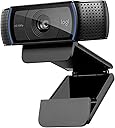
The Logitech HD Pro Webcam C920 delivers professional-grade Full HD 1080p video calling and recording with advanced H.264 compression, dual noise-reducing microphones, and precise autofocus. Compatible across major operating systems and equipped with a durable universal clip, it ensures crystal-clear visuals and natural sound for seamless virtual meetings, streaming, and content creation.
| ASIN | B006JH8T3S |
| Antenna Location | video calling and recording |
| Best Sellers Rank | #44 in Webcams |
| Brand | Logitech |
| Built-In Media | USB Cable, User Manual |
| Camcorder Type | Webcam |
| Color | Black |
| Compatible Devices | Personal Computer |
| Connectivity Technology | USB |
| Customer Reviews | 4.6 out of 5 stars 32,736 Reviews |
| Digital Zoom | 3 x |
| Display Resolution Maximum | FHD |
| Effective Still Resolution | 15 mp |
| Effective Video Resolution | 1080 pixels |
| Exposure Control Type | Automatic |
| File Format | JPEG |
| Flash Memory Speed Class | C10 |
| Flash Memory Type | Micro SD |
| Flash Memory Video Speed Class | V10 |
| Focus Type | Auto Focus |
| Form Factor | Webcam |
| Global Trade Identification Number | 00097855074355 |
| Image Aspect Ratio | 16:9 or 1.78:1 |
| Image Capture Speed | 30 frames_per_second |
| Image stabilization | Digital |
| Item Dimensions D x W x H | 3.7"D x 1.7"W x 2.8"H |
| Item Weight | 113 g |
| Lens Type | Glass |
| Manufacturer | Logitech |
| Maximum Aperture | 2 f_stop |
| Minimum Aperture | 2 millimeters |
| Model Name | Logitech HD Pro Webcam C920 Video Calling and Recording 1080p Camera |
| Model Number | 960-000764 |
| Number of Batteries | 1 Lithium Polymer batteries required. |
| Operating System | Windows 7, Windows 8, Windows 10, macOS 10.10 or later, Chrome OS, Android 5.0 or above |
| Photo Sensor Technology | BSI CMOS |
| Screen Size | 3 inches |
| Sensor Type | BSI CMOS |
| Shooting Modes | Autofocus |
| Special Feature | Auto Noise Reduction,Auto Low Light Correction,Autofocus |
| Style Name | C920 |
| Supported Audio Format | AAC, MP3, WAV |
| Supported Image Format | Likely includes: JPEG (for still images), MP4 or MOV (for video) |
| UPC | 097855074355 |
| Unit Count | 1 Count |
| Video Capture Resolution | 1080p |
| Video Resolution | 1080p |
| Warranty Description | No Warranty |
| Water Resistance Level | Not Water Resistant |
| White Balance Settings | Auto |
| Wireless Compability | 802.11a |
| Zoom | Digital |
D**T
Going strong, two years later
I'm puzzled when I read the negative reviews, about this camera not working with [x]; this is my 3rd Logitech camera, and I've never had a problem getting them to work when I've reviewed the system requirements and made sure I was on a compatible machine running appropriate software. I've split use of this camera between my Mac Mini and my Macbook Air, and had no problem getting it to work on either machine, nor have I had any issue switching back and forth between them. Picture and sound quality are excellent, and there's a free Logitech app in the App Store that lets me adjust the zoom, lighting etc that's also effective and simple to use. What's really blown me away is that it's also just as impressive now as it was almost two years ago, when I first started using it. I bought it in October 2016, to replace another Logitech camera; the cord connected to the back of the camera had frayed over time as a natural consequence of adjusting the angle over and over, making the older camera only work sporadically, and I fully expected something of that nature to happen to any camera I purchased. Not so with this one. The cord has held up, and not because I've babied it; it's just a sturdier design and tougher than the model it replaced. And while we now have Ultra HD/4K cameras and better, this 1080p is still respectable quality; it's not like the old "high def" TV a friend of mine has that's 12 years old but whose picture now looks grainy and not at all impressive compared to other newer TVs. I've used a projector as a monitor for my Mac Mini and broadcast the video from this camera onto a relatively big screen (bigger than any TV I've seen) and the picture quality is still impressive. (I hope I don't jinx myself!) I'm not accustomed to peripherals like this maintaining their function over time. Either the gadget breaks or it becomes obsolete because newer versions of it do the job so much better that it becomes a relic. Not so with this camera. I spent more than the current price (not quite double what it's going for now) and still really feel like I got my money's worth. If I needed another camera I would consider buying another one, it's that good. It's nice to not have One More Thing that needs to be replaced, that just keeps working. So yeah, take the time to look at the system requirements, and make sure you're using a Mac running the stated minimum version of MacOS (or better), or a PC running the stated minimum version of Windows (or better), and your processor is fast enough and you've got enough room on your hard drive and all that, before you buy it. If you're planning to use it for a specific app, perhaps you should check with that app's developers to be sure that it's compatible with it, but I can vouch for Mac versions of Skype, Zoom, ezTalks, and of course FaceTime and Photo Booth, as well as browser plugins for Firefox, Safari, Vivaldi and Opera: it works with all of them. I can't say enough good things about this camera. Unless you just absolutely have to have 4K/Ultra HD quality video, it's well worth the price it's currently going for, and I am happy to recommend it.
D**A
This webcam is great!
I purchased the Logitech C920 and I'm very happy with it so far. After reading lots of reviews, I decided to purchase this webcam because 1) with software you could get 15 megapixel image quality and 2) you could use a tripod with it. I had read many reviews with some saying that the C910 had better image quality because it had 5 megapixel true whereas the C920 had only 3 megapixel true. That was a concern for me at first. Also I was concerned about reviews that said it is very good for close-ups but not good quality for the background. I found it was high quality for both close-ups and background. Also, some had said that the camera only "sits" on top of the monitor. Well, that is NOT true. There is a clip and it allows it to fit any monitor thickness which is a plus. You can even have it sit on top of you CPU tower on on the tripod (which you must purchase separately -- important because I thought that the tripod came with it). I purchased this webcam to replace my much older Logitech 4000 webcam. As I expected, the image quality of this webcam is so much better. I don't get the blur and it isn't as grainy as my older webcam. I took a video of me holding up my credit cards and you could read the numbers on the credit cards very clearly. It blew me away because I wasn't even using zoom. I even made a video with the lights off with just the monitor on and the image quality of my face was super! I love the widescreen to it and I love the hi-def. I also read about the noise quality -- I think all webcams have this issue, but this one is much better. Some said that this is not a good webcam for travel. I disagree. This webcam folds up and it will fit any thickness of monitor you need it for, and if you have one of those dinosaur monitors, you can just have it sit on top of it. Only 2 negatives I see so far is that it does not have 360 degree turn or any turn for that matter. But for sitting on top or my monitor or on a tripod (which I need to purchase), it does great. My old Logitech 4000 that did rotate was always turning when I didn't want it too. Very annoying I must say. With the 920 I can adjust it going up and down, just not side by side, so it is not a problem for me. Other negative is that if you want to do a video call with someone they have to be using the same software and I don't yet know how the image quality would be with other software since it is the Logitech software that gets it to 15 megapixels. I need to try that out too. Could I get a better webcam? Sure, if I wanted to pay a lot more! For the price, this is a great webcam and so far it is doing what I need it to do. I only did a few test pictures and videos today (only received it today), but so far I love it. I still need to see how it works for web calls and such. I also need to learn how to make some of the great effects it has. All in all, this webcam beats any of the other ones in the Logitech line for features and image quality. This is also my first review ever. I felt I needed to write a review because there were so many negative reviews on this product. I am ready happy with my purchase and I'm glad the negative reviews did not sway me to not purchase it. I'll play around with it a bit more and see if I still love it :)
A**X
the Logitech hasn't disappointed me. It was easy to setup (assuming you ...
I'm creating an inexpensive multi-point business video conferencing system using low-cost, off the shelf commodity components, and I'm using the Logitech C920 as part of this effort. Considering that a top quality PTZ (Pan/Tilt/Zoom) camera can be several thousand dollars, I needed an alternative that could put out a reasonable 1080p image at an affordable price. Since I can control the lighting and so forth, I don't really require anything special in terms of low-light performance...all I really need is a camera that puts out a credible image when displayed on a 10 foot projection screen, and is simple enough to work with a variety of online video conferencing systems, including Skype, WebEx and so forth. So far, the Logitech hasn't disappointed me. It was easy to setup (assuming you have a Windows PC in the mix) and it performs well. Construction quality is good for the price, and it's so small as to be easily mounted in a variety of settings (mine is attached to the top of a 65" plasma monitor using a custom bracket). With good lighting, I get very good video quality out of this small camera, even when compared to my firm's $100K Telepresence system. I can't really speak to the audio quality - we're using an in-ceiling microphone and speaker system, so we have little need for the built-in audio on this camera. On the software front, so far we haven't had any issues whatsoever, and the camera works with just about everything we throw at it. The one exception is Macs - although we have good results viewing video on Macs, it doesn't seem possible to connect the C920 to a Mac directly - you need a Windows PC somewhere in between (it *does* work with Windows under VMware Fusion on a Mac, so long as you have a really fast Mac). Definitely recommended at the price.
M**B
A really well designed system!
The camera was well researched before any decision was made to purchase. I research just about everything I purchase. I first research the different available items on the internet. Then to Amazon to check prices and the reviews. Then back to the Internet for further reviews and then to YouTube for further information. Luckily this system has proven to work about 90 to 95% of the time. Once again my system worked out pretty well and the decision to purchase at Amazon was made. Amazon doesn't actually have the best price for the camera. Taking into consideration the cost of shipping ( Prime ) and Amazons return policy usually sways me. The camera arrived in anticipation of the arrival of a new computer system. I'm handicapped and must rely on computer service companies to do the take down of the old system and installing the new one. Because of cost for that service I wanted to make sure everything was here to avoid additional charges. Along with the camera there were additional items purchased for the new computer. Those have been reviewed at Amazon as well. Everything went as planned and the new system worked great. Everything was installed and I retired for the evening in anticipation of exploring the following morning. I checked each and every add on to make sure it all worked. The camera was mounted on the monitor by the technician who told me it was a well designed for mounting just about anywhere. It's a simple USB connection and the Windows 10 OS picked it right away and added it to the Apps column, control panel system layout. I'm not a computer wiz kid so excuse me if I get some things wrong. Went to the all applications column and double clicked. There I was dead center in the monitor staring at myself. Now I'm not the handsomest person in the world but I must say I looked damn good. It sets itself at the highest resolution so everything is sharp. The auto focus is right on and each movement didn't cause the camera to try and refocus. There aren't any written instructions and no software included with the camera. I ended up first going to YouTube and found instructions. Then I went to the Logitech web site where I was told that there was no software needed for the camera. There are some simple settings you can work with but they just didn't seem to be enough. Went back to YouTube and found there are software drivers available. Went back to the web and in the search I typed Software got Logitech C920 camera. Yes indeed there are quite a few down load sites. Make sure you go to the official Logitech site to avoid private download companies who try to sell you the world before letting you get close to any software. Been there and done that. Just look up the camera and download and expand the files. I opened the installed drivers and followed the simple instructions to customize my camera. There is a big difference when you take over the default setting. Another quirky thing I found. I've had other Logitech products that once connected requires the registration of the new item. It wasn't until I was into my fifth or sixth use of the camera did the registration window appear. So I registered only to be told that the E-mail address I put down was already in use. Ahh I said it must be from my previous purchases. So I went in as a registered user only to be told that my password was incorrect. Well I write all passwords in a special place as getting on in years I do forget. Sure enough the password I used was the right one. Retried and again was denied. Finally I gave up and found forget password box. The funny thing is that they sent an E-mail telling me my password which was the exact thing I had posted originally. Registration is easy. Put the information in and then another problem. They ask for the serial number. I checked everywhere on the device, the package material and the box. They don't give you a serial number. After a few calls to Logitech and some hold time I was informed the registration doesn't need a serial number. Just bypass and hit the enter box. Sure enough it registered and on I want. Shortly after I received an E-mail from Logitech welcoming me and stating if I include the serial number I'll get free updates and better tech help. By this time I was so infuriated I decided to move onto something else. I'll call back and straighten it out in the next couple of days. As far as the camera is concerned it's everything I hoped for. As far as the rest just be prepared to do a little work to find the available software and the agony of registration. The product was reviewed without any financial considerations. The product was purchased at full Amazon retail.
J**L
Excellent Camera for Mounting on a Monitor
Extremely easy to set up with excellent video quality. All I did was plug it into the Mac Mini and it worked perfectly the first time I tried it.
P**R
Good
Been using this for years. No issues and if there were they were easy to fix.
S**R
Great buy still using in 2026
Logitech is one of the best connectivity set up Zoom easy to set up. The color quality is great. You can use the lighted or un-lighted indicator on the camera for privacy. I love its great for discord video chats and live streaming
A**M
Live-Streamers Delight! Definitely Buy
Intro story: Hey guys, so I recently got in to making videos on YouTube for my channel (Soft Served) and I started to branch out and do livestreams. I did livestreams for a few months and decided I wanted to buy a desktop camera so I could add a face cam to my videos. I looked on YouTube for literally “best camera for live-streaming”. I watched the video and this camera caught my eye, so with only that much info I bought it and it came in about a weeks time. Now I’ve had it for about a month or so and I really like it. Actual review: The camera quality in terms of durability is great, I do my best to take care of it since the lense cover is plastic as well as the entire unit. The built in clip it uses to mount to your monitor is very nice and I’m sure as long as you don’t have a 90’s cathode monitor I’d say it will definitely mount on any screen you have. Next let’s talk about how it performs, the resolution is very clear (1080p) and there is hardly any lag between for example; moving my hand in front of the camera is very responsive when played back since it transfers my actions to the screen almost immediately. It handles well in low light but like most cameras, it shines recording in well lit areas. It also comes with a program to run it and I guess it could be useful but I’d swap to OBS or something where you have a lot more choices with user customization. The only thing this guy struggles with is audio, for the love of god please don’t use this camera’s microphone to record or stream with because it picks up everything. It’ll hear the AC on low behind your grammas closed bedroom door and make it sound like a 747 is taxing to the runway which happens to be three feet from your house. Don’t use it. *As a tip for recording with audio on this, if you have good editing software like Vegas Pro 14 or whatever you can record the face cam, then add it to your editing software and use Audacity to record the MUCH cleaner audio and sync the audio from your source microphone (I have the Blue Yeti) to the audio from this camera and once you’ve got it how you like, just mute the camera’s audio and you have a perfectly synced video with very clean audio* If my c920 broke tomorrow (due to dropping or crushing somehow, etc.) I would be ordering a new one. I recommend this camera for pretty much any application you could think of including Skype or Discord. It’s worth it Ps. If anything should happen I’ll revise my review -Toodles, Soft Served
S**A
ótimo
estou usando desde que chegou. ótima imagem
H**M
انصح فيه
والله هالكام ممتاز جداً انصح فيه جودة وسعر والكل تقريباً يستخدمه
A**Y
Great Camera
As I podcast and Zoom link a lot I wanted a camera like this for my extended large screen. It took me a short while to understand the settings and learn how to mirror my image but it isn't that hard to work out once you get the hang of it. Slots and rests on top of the big HP screen in my small office and it gives me a lot better screen view and recording sound. I have also liked Logitech products and they have not failed again in this item.
J**.
Excelente
La Logitech C920 HD Pro Webcam es, sin duda, una de las mejores cámaras web que he tenido el placer de usar. Desde el primer momento, su calidad de imagen en FULL HD 1080p a 30 fps me dejó impresionado. La nitidez y los colores vibrantes que ofrece son perfectos para videollamadas, streaming o incluso grabación de videos. Una de las características que más destaco es su autofocus rápido y preciso, que asegura que siempre estés enfocado, incluso si te mueves ligeramente. Además, la cámara cuenta con un micrófono estéreo integrado que captura el audio con claridad, eliminando la necesidad de usar un micrófono externo en la mayoría de los casos. La compatibilidad con múltiples plataformas (como Zoom, Skype, Microsoft Teams y OBS) hace que sea una opción versátil tanto para profesionales como para usuarios casuales. Su diseño compacto y robusto se adapta fácilmente a cualquier monitor o laptop, y el soporte integrado es ajustable para encontrar el ángulo perfecto. Otra ventaja es su facilidad de uso. Simplemente la conectas a través de USB, y está lista para funcionar sin necesidad de instalar controladores adicionales (aunque el software Logitech ofrece opciones adicionales de personalización). En resumen, la Logitech C920 HD Pro Webcam es una inversión que vale la pena si buscas una cámara web confiable, de alta calidad y con un rendimiento excepcional. ¡La recomiendo totalmente!
L**E
Crystal-Clear Connections: Elevating My Craft with the Logitech C920 HD Pro Webcam
As the owner of a multifaceted creative business that spans from the delicate work of jewelry making to the cutting-edge realm of 3D design and beyond, maintaining a high-quality online presence is paramount. This necessity became all the more apparent as I ventured into the world of vlogging and live streaming to showcase my work and connect with my audience. The Logitech C920 HD Pro Webcam has been a revelation in this journey, transforming how I share my craft with the world. From the moment I integrated the C920 into my setup, the difference was night and day. The camera delivers stunning 1080p video quality that captures the intricate details of my creations, from the subtle textures in a piece of hand-carved wax to the vibrant colors of a sublimation print. This level of clarity has allowed me to share my work with unparalleled precision, providing my audience with a true-to-life view that's as close to holding the pieces in their hands as possible. The C920's widescreen format has been particularly beneficial for my live demonstrations and tutorials. It offers a broad field of view that easily encompasses my workspace, allowing viewers to follow along with every step of the process without missing a beat. This feature has made my streaming sessions more engaging and informative, fostering a deeper connection with my audience. Moreover, the webcam's autofocus and light correction capabilities have proven invaluable. Whether I'm working late into the night or capturing the delicate sparkle of a gemstone under studio lights, the C920 adjusts seamlessly, ensuring my videos always look professional regardless of the lighting conditions. This adaptability has saved me countless hours of setup time, allowing me to focus more on my craft and less on troubleshooting technical issues. The ease of use and compatibility of the Logitech C920 HD Pro Webcam have also been standout features. Its plug-and-play setup meant I was up and running in no time, compatible with both my desktop and laptop. This versatility has been essential for maintaining the flexibility my work demands, whether I'm streaming from my studio or sharing insights from a craft show. In conclusion, the Logitech C920 HD Pro Webcam has been more than just a tool; it's been a catalyst for growth in my business. It has elevated the quality of my online content, enabling me to share my passion for jewelry making, 3D design, and more with a clarity and professionalism that truly reflects the essence of my work. For any creative professional looking to enhance their online presence, the C920 is, without a doubt, a wise investment. It's not just about showing your work; it's about sharing your vision with the world, one crystal-clear video at a time.
Trustpilot
1 month ago
4 days ago