Desert Online General Trading LLC
Dubai, United Arab Emirates
Desert Online General Trading LLC
Dubai, United Arab Emirates


🖇️ Label like a pro, plug in, and power up your productivity!
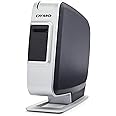
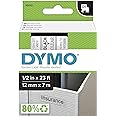
The DYMO LabelManager Plug N Play is a rechargeable, USB-powered thermal label maker compatible with PC and Mac. It requires no software installation, supports custom fonts and graphics, and prints a variety of barcodes. Designed for professional use with authentic DYMO D1 tapes in multiple sizes and colors, it offers a lightweight, efficient labeling solution with built-in tape cutter and auto numbering.


| Paper Size | 1/2 |
| Media Size Maximum | 13 x 19 inch |
| Maximum Sheet Capacity | 1 |
| Color | White&Grey |
| Is Electric | Yes |
| Printer Connectivity Type | Bluetooth |
| Hardware Connectivity | USB |
| Control Method | App |
| Ink Color | Black |
| Print media | Labels |
| Item Dimensions D x W x H | 3.15"D x 6.81"W x 8.74"H |
| Item Weight | 1 Pounds |
| Display Type | LCD |
| Compatible Devices | PC, Laptops |
| Printer Type | Thermal |
| Printer Output Type | Color |
| Additional Features | Tape Cutter, Lightweight, Auto Numbering |
| Color Pages per Minute | 1 ppm |
| B&W Pages per Minute | 1 ppm |
| Dual-sided printing | No |
S**E
Excellent Avery Label Printer! I would recommend
Excellent unit... I had start up issues... Nothing was really wrong, but it would not print... I called Tech Support and they were very good and worked with me... Not sure what we did, but it is working perfectly with no issues. Labels print great and very legible. Very Cost Effective... Had initial issues with connectivity and contacted support and we got it fixed, but as noticed, something was funky on it, and Support helped me through it and having no issues... I am going to call it a computer glitch... Working Great and I would recommend.
L**K
Good label printer until the battery dies.
Edit (again):Ok, I hate to keep editing my review but I'm getting a bit upset with the same problem. This label maker uses a proprietary Dymo battery instead of simple and cheap batteries you can get anywhere. Granted it's a Li-Ion battery, which should stay charged, but this is the second one I've had with the same problem, the battery gets too low to print a label. This label maker is plugged in directly into my system, not a hub. Now, I'm supposed to buy a new battery from Dymo? No.The cost of the battery is the same cost of the unit itself. It's cheaper to just buy a new label printer that comes with a new battery. My solution is going to have to be buying a different brand label printer that may cost more but has an included AC adapter or uses standard AA batteries.So, overall, stay clear of this one, spend a little more money and get one that doesn't die when you need it.Edit:The problems I've been having with it (mentioned below) have been resolved because Dymo and I have worked things out. They are sending me replacements for the parts that failed free of charge. I guess they want to keep their customers happy. So, I'm satisfied again and look forward to using this type of label printer again.Old post:I was using this label printer recently and loved it until the battery died. The labels are nice although it's got a manual cutting blade. The software that actually comes loaded inside the label printer is basic but does the job. I actually copied the software to my system and run it from there. The label cartridges are available at many places, including Amazon, naturally.The problem starts when the rechargeable battery stops charging. The battery seems proprietary and slowly drains regardless of how you plug it in. I had it plugged into a powered USB connection and it still died. The printer WILL NOT work unless the battery is charged. I just don't get why something like this needs to be plugged into a powered USB connection AND needs the battery to work. I have other hardware that has higher power requirements and runs solely on USB but doesn't need a battery to function. So, if you need a label printer like this but don't want to be FORCED into buying a new battery every so many months, steer clear of this one.
C**R
Very Nice With One Drawback.....
Since I have another DYMO Hand Held Label Maker, I sort of expected this one to be very much like it. I was very much wrong. This PNP Label Maker is very much just what it says it is. A very good label maker that connects up to a PC at a very good price. I was a bit concerned about how easy it would be to hook up. (I can sometimes get confused about what goes where when getting things hooked up right.) But I shouldn't have worried. The instructions are very clear and it's hard to mess up. After placing the batteries into the label maker. (They only go in one way.) and snapping in the supplied label tape cart. and plugged it into a available USB slot and it was "seen" right away as a addition drive on your computer. After the computer "sees" the drive you either right click and selected open or double click on the DYMO software icon and it opens the app where you create and then print your labels from. I was impressed how easy it was to print out the first label. And it printed out almost right away after I clicked the print button. I also was impressed by the quality of the label itself. I was expecting the same or somewhat like the same type of label that my handheld label printed out. Instead this label's surface is shiny and it feels a bit tougher than the older hand held labels I'm used to. The blank label refills are a bit more pricey, but not by much and given the way they look when applied, I could deal with that. One small thing that may cause some people a problem, but wasn't one for me. If you turn off or unplug the label maker, it acts just as if you had unplugged a USB external drive. That is, it isn't available unless it's plugged in and powered on. So if you use the power button on the label maker, it acts as if you've disconnected the label maker totally even though it's still plugged in. Since I usually leave my systems on, this isn't a real problem for me. Overall, I'm very happy with my purchase and can say, so far, it's a really good way of getting a label maker attached to your computer. Good job!!8/25/15 Update: The only problem I've had with this label maker is with the battery and that was more than likely my fault. But I feel a buyer should know this. If you have problems check out the battery as mine seems to have gone dead. It wouldn't recharge and as a result the label maker's software doesn't remain connected to the PC but will drop in and out and finally out altogether. Batteries are available at DYMO for this item but I couldn't find one on Amazon that would fit it. Still a really good label maker but this one thing is a problem as you should be able to get a replacement battery easily and not have to buy from just one place. This doesn't change my rating but is there for consideration.
Trustpilot
2 weeks ago
1 week ago