

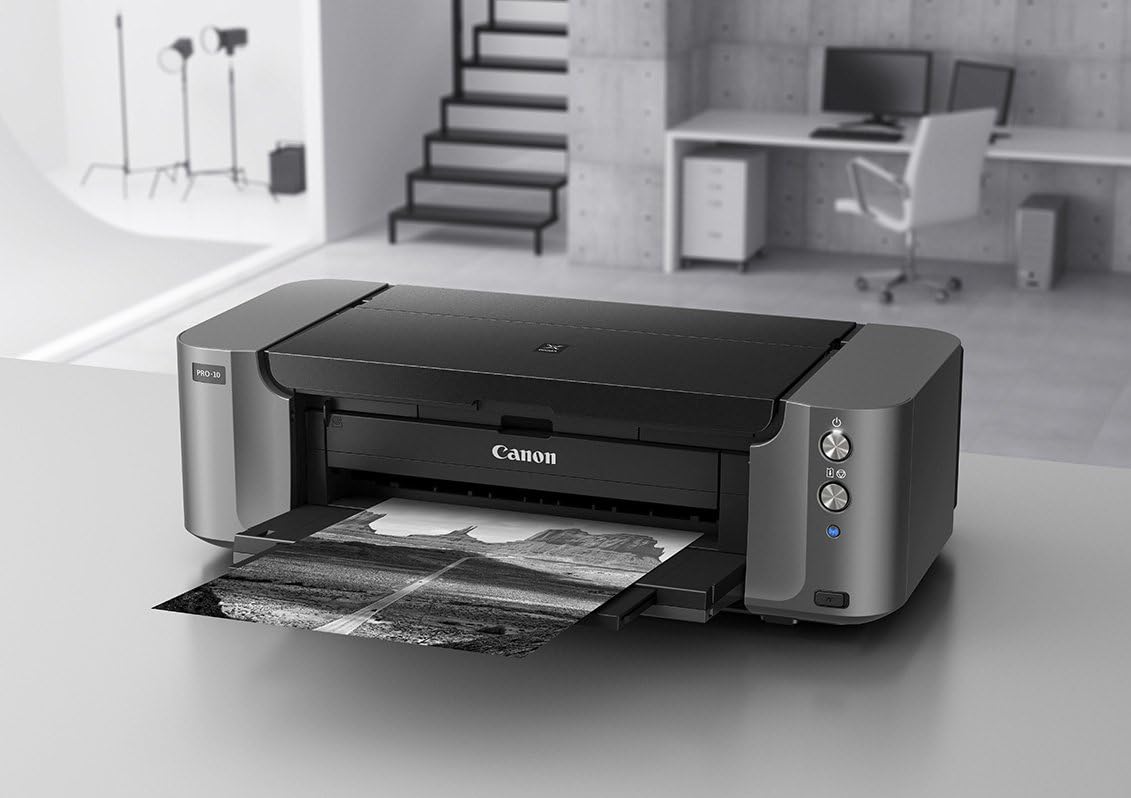


🎉 Elevate Your Prints to Art Status!
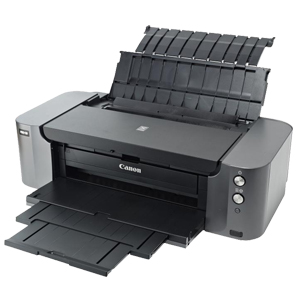
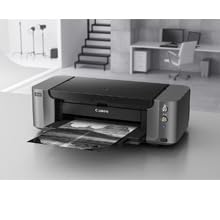
The Canon PRO-10 Wireless Color Professional Inkjet Photo Printer combines advanced pigment-based inks with a sophisticated image generating system, ensuring exceptional color accuracy and depth. With dedicated monochrome inks and user-friendly software, it’s tailored for professionals seeking top-tier photo printing solutions.

J**.
Amazing printer but maybe not for everyone.
Please skip the intro if you want to go directly to the review, however intro can put a little light on the review 'methodology'. In any case get ready for lengthy review.IntroHere is a little background information on me before the actual review so people can look at this review from the clear point of view.I do extensive reviews rarely and usually only either if I really like the product and want others to find out about it or if I am really disappointed in a product and want to warn others.I am by no means a professional photographer, however I have been on and off serious amateur photographer for almost 20 years now, going back all the way to 35mm film SLR cameras.I got into digital photography as soon as first, under 1 MP cameras, became available.Over the years I have gone through several inkjet and laser printers and my previous one is Canon i9900.This is the one that I will be making comparisons to, if any.Few last words of this introduction.When it comes to photography I consider myself purist and pragmatic in a sense that I am not a pixel peeper, I don't do very extensive technical tests with test sheets and such. All I really care is how photo looks to my eyes and eyes of other people I care about.I also tend to have realistic expectations when it comes to the results of amateur photography. I do not expect every picture to be perfect and every print to be perfect. This is something I carried over from film photography and digital makes it so much more cost effective as you can take hundreds of pictures and pick the ones you really like.Review of Canon PIXMA PRO-10.I am writing this because I am compelled to spread the word about this 'little wonder' and clear some of misunderstandings and expectations when it comes to this product.My setup.Custom build Intel I7 PC with 16GB of RAM, SSD as system disk and Windows 7 Professional installed. Monitor is Samsung S32D850T. It is not IPS panel but AMVA+ (you can look up the differences) but so far I am very happy with it. Monitor is calibrated by yours truly, manually and by my own eyes with calibration software but not any colorimeter. Again, I am not a pixel peeper and go by look and feel.All test photos so far were taken with either Canon 5D Mark II or Canon 40D and printed directly from Canon Digital Photo Professional software.First impressions.It is heavy, which is not a problem for me. It takes quite a bit of space so make sure that you have plenty of desk space, again not a problem for me.It comes with full set of 10 inks and as far as I can tell these are full PGI-72 inks and not some priming half capacity inks.Set up is not very difficult but I am technically inclined person so take it with the grain of salt.The only thing I had a slight issue with is setting up WIFI connection directly without USB cable connected. There is such an option but I could not get it to work initially so I gave up and used the option with USB cable connected. Once set up you can disconnect USB cable and WIFI works like a charm.Make sure you can place printer close to your computer or have a spare long USB cable as cable provided by Canon is really short. This could be a gripe for some but I do not care as I use WIFI and I also have other USB cables I could use if I wanted to.Once you put the print head and the inks in the printer goes through a cycle of priming and alignment, which you can print on regular paper.Initial test prints.First test printouts were done on 4x6 Costco Glossy Photo paper. Very impressive, colors very natural and vibrant but not too vibrant, matching the picture on the monitor color wise but little darker. When it comes to color reproduction this is exactly what I remember the scene was when I was taking the pictures.I printed same pictures on the same paper for comparison on Canon i9900 (dye inks) and the colors are more 'colorful' but do not match those of the actual subject. It is not that they just popping out more or anything but it seems that the color space shifted a little or something. PRO-10 colors seem much more natural to me.More test prints including large format and various papers.I had some Canon Glossy Plus paper but ordered 8.5x11 and 13x19 of Canon Pro Luster and 8.5x11 of Canon Pro Platinum.Also when ordering some spare inks from Canon I got some free 5x7 and 4x6 Canon Glossy Plus II paper.I printed some 8.5x11 of Costco Glossy, Cannon Glossy Plus, Luster and Platinum. I must say I am very impressed with handling on Costco paper and totally blown away by prints on Luster paper.With my Canon i9900 printer I used to print primarily on glossy but small sizes of 4x6 and 5x7, sometimes 8.5x11 and greater but not too often.I never knew what I was missing by not using Luster paper. For me, combination of PRO-10 and Luster paper is just mind blowing. 8.5x11 look glorious but 13x19 look out of this world because they are bigger and you can see so much more in the print. I mean mind blowing for amateur printing at home in this printer price range.So far I printed a lot of landscapes, sunsets (one of my favorite subjects), people in landscapes, people in various situations, underground caverns (really good color reproduction) and some cityscapes.I framed one of my very `moody' sunsets 13x19 prints in inexpensive matted frame from IKEA and my wife put it up on the wall. Friend of hers came over couple days later and noticed this on the wall and thought my wife bought it at the store. Average person cannot tell the difference. To be honest with you if the same picture was actually printed for mass store sales I do not think I could tell the difference, maybe the paper quality in mass prints would cause it to actually look even worse. I certainly have seen much worse in stores.When I print using this printer my daughter constantly accuses me of editing the photos because she says they look too good.All these prints were printed directly from DPP from RAW format and with no adjustments to the pictures themselves. Again, as a purist I do not tinker with my pictures much, if at all. I'd rather take 100 photos and have 10 come out the way I intended then tinker in photo editing software. Digital photography saves me a lot of money on developing unusable pictures but I do not take it as an excuse to just press shutter button away with no sense of what I am shooting or what I want to get out of scene or subject. It sure frustrates my wife when I take pictures because she says it takes forever but she is changing her mind now after seeing some of them printed in large format. She almost never sits down with me at the computer to look at them and 4x6 do not give most of photos enough justice.One thing that I have noticed that the brightness of prints is sometimes but not consistently darker than the screen. When the scene is darker to start with, sometimes I have to adjust in the Canon Print Studio Pro plug-inn to brighten it up a bit. However, when the scene is bright to start with, usually no adjustment is necessary.So far I have used ICC profiles with Perceptual setting and not played much with other options, especially `environmental' white balancing options but will do that later. At the moment I am more than happy with the prints as they are.When you print photos with a lot of white make sure that you use option of covering entire image with Chroma ink, otherwise you may get weird `holes' of unevenness in the picture, which can be mostly noticed if you look at the angle or if the surroundings of this spot are in contrast with white. It is especially noticeable on glossy paper.If you use auto option you will not save much of Chroma as it will be used on most of the print anyways, unless it is mostly white.I have not tried black and white prints just yet so not sure how Chroma affects/helps with that. I would use matte paper for black and white anyways so the Chroma should really not be needed as it is supposed to reduce glossiness variations.UPDATE: I have printed some black and white and here are few comments on that. First off, Chroma is not used on matte paper. Second, I was wrong about printing black and white only on matte paper. I printed few shots of the moon I took with my telescope and I thought it looked great on matte 8.5x11. Then just for the heck of it I printed on Luster (with full Chroma coverage) and I was really blown away by what it looked like. This is one of my most favorite prints I have made so far. I cannot believe I actually made this shot and I know the conditions were not ideal and I can do much better. I was wrong and I will print a lot of black and white on Luster paper going forward.To summarize the prints. Color reproduction, color transitions, color coverage, trueness to original subject, skin tones, shadows, etc. are all outstanding in my book. I could not be happier. It makes me want to print again and made me go through my photo library to find the next printing subject.It is not night and day compared to my Canon i9900 but a noticeable difference, especially when it comes to being true to the original scene and subject combination.If you shoot or make HDRs and you want them to really pop out of the frame then you might want to consider dye based printer but to me this does not look natural and if I wanted to do that I still have my trusted Canon i9900.Software, paper handling, print speed, etc.The printer comes with the driver that allows for many print parameter changes as well as monitoring the ink level.The ink level monitor works fine on WIFI connection, no USB connection needed. The ink level indicator is somewhat helpful but seems to move in ¼ increments. I would prefer much finer increments, especially when I start running down to the bottom of the ink tanks.Included is also Canon Print Studio Pro plug-in that works in DPP. Canon says it also works in Adobe Photoshop and Lightroom but I do not use either so I cannot comment. If I edit my photos I use DPP and if need be I use Corel Paint Shop Pro X6 Ultimate. Unfortunately even though Paint Shop Pro is an incredible piece of software it is not supported by Canon. I would encourage anyone to download trial version and see for themselves how much you get for much less money. I do have older version of Photoshop because I got it at very high employee discount but I see no reason to be paying this much for any newer version after discovering Paint Shop Pro.The paper feed is pretty much straight forward and problem free. So far I have not had to use the rear feeder yet, just the top feeder, which worked just fine up to 13x19. I think I would use rear if trying to feed fine art paper (thicker) or maybe if trying to feed little longer paper to prevent bending. Canon says up to 19 inch length is supported but I heard of others feeding a bit longer.Print time is on a longer side comparing to my `old' Canon i9900. Not that I care but you need to be a little patient, especially with big formats. Granted I printed everything on the finest setting and did not try to do any printing with fast setting. I will not give you time measurements here because they are pretty close to Canon estimates in the specification sheet.The overall cost including ink and paper cost.First off, I bought it on Amazon when it was 599.99 USD. This combined with Canon 250 USD rebate (already claimed) would give me the cost of 349.99 USD. For what you get as a product it is incredible value in my personal opinion.The paper cost depends of what paper you will use and/or prefer. If you shop wisely or take advantage of the free paper offers from Canon it is more than reasonable. If you are using larger formats then you might want to shop around but Canon direct is only reasonably priced on bulk options and on very few papers. Most papers are more expensive than on Amazon.If you get addicted to Canon Pro Luster, like I did, then I think if you buy wisely it is very reasonable cost for the quality you get.For 4x6 I would urge you to try non-Canon options. Costco 4x6 is cheap and good quality at this size is very good. They also sell 8.5x11 but only in Glossy and in this size I prefer Luster.Now the big elephant in the room, which is the ink cost.Everyone is always griping about how much it costs to print on this or that printer. I approach it from the different angle, so before I take it on actual ink usage and cost here is my 5 cents. If I get my prints to look amazing like they do from this printer and compare to other options, mainly processing through service outlets and consider prices they are charging and not being able to proof it or print again right away if I don't like it, then it is not even fair comparison. All I would now worry about is only whether the inks will be always available at the current prices and whether the printer will hold up and when I need to change the head. I could not find a reliable source of print heads just yet, so I do not know how much they are. The famous auction site had them ranging from 60 to 80 USD but I am considering buying another printer instead just in case but only one rebate per customer so maybe I will not do it. After all they might make even better printer in the future.The individual tanks are 15 USD each and you can get slight brake if you buy 4 packs and much bigger price brake if you buy 10 pack. I would suggest buying one additional 10 pack with the printer and then buy smaller packs or individual when you figure out your usage.Now when it comes to the usage, it is kind of dependent of what you print. The individual tanks are used differently depending on the photo content. My below usage is based on the prints I made, which had a high percentage of sunsets with intense shadows, darker colors and also the sun itself.The two tanks that initially were being used the fastest for me were Grey and then Chroma, in that order.Initially I printed few prints without full Chroma coverage but then I consistently used full coverage.So I stocked up on additional Grey (individual) and Chroma tanks (value pack). If you order directly from Canon shipping is free and they seem to be running a lot of promotions lately. So far, I got two free photo albums (pretty nice) and bunch of free paper, mostly 4x6 Glossy Plus II but also 5x7 Glossy Plus II and 8.5x11 Matte.After printing the following number of prints:4x6 - 185x7 - 68.5x11 - 813x14 - 5Here were my tank levels:PM-75%PC-75%Y-75%M-100%R-100%PBK-75%C-100%CO-50%MBK-100%GR-50%I may not be a pixel peeper but I do analyze how much things cost me for what I get out of them.Using not very advanced mathematics, it cost me 26.4USD of ink to print the above mentioned prints, which comes down to around 0.01USD per square inch.In layman terms it means 0.24 USD per 4x6 print, 0.35USD per 5x7, 0.94USD per 8.5x11 and 2.45USD per 13x19.If you include cost of paper this means that volume prints of sizes below 5x7 are much cheaper at Costco. Bigger sizes come out to the similar price. Comparing the quality of 4x6 prints at Costco to this printer, Costco is no match. I never did large prints but I would assume it might get worse with those. Also no option of printing from RAW image. I think they only accept JPG of TIFF.This all is assuming the ink levels are due to the actual printing and not head priming and that the usage levels will continue in similar fashion.Also worth mentioning that as per one of the reviews advice I keep the printer switched on at all times, supposedly to prevent from priming the printer head whenever it is switched on.Summary.Great printer and you get much more than you pay for when the printer is concerned. With ink and paper I think you still get more than you pay for but that depends on your prints and what you are comparing them to.For the quality and size of the prints I get I am more than willing to pay for the ink.This printer will not make photos look better than they are, maybe with an exception of times when size of the print is 8.5x11 and beyond and type of the paper used (especially Luster) adds additional dimension to the photos.I would definitely buy this printer again and I already wish that it could print even bigger sizes.Maybe one day I will buy 24 inch wide printer (already dreaming of PROGRAF iPF6400) but currently cannot justify the cost since I am only printing for me and friends and do not charge for prints.From some professional print house reviews of this printer it seems more economical but only when large volumes are printed. It can do however canvas and banners so I will keep on dreaming.Bottom line, if you are looking for making great large format prints for your own use or even for sale, go and buy this printer. You will not be disappointed.If you are looking for a cheap way to print volumes of 4x6 prints at a good quality, this printer running cost might be too much for you, so go ahead and find something in dye based printers in a smaller format. You will save money in the long term.This is pretty much it. I hope you find this review useful.
T**T
Sorry, but mine is defective
This printer came less than 2 weeks ago and today isn't printing at all, after many trials. It didn't print on its first day either, then printed several documents. Now it's quit again. And it won't move the ink carrier into position.When the printer powers either up or down, it makes an ominous loud clattering noise, sometimes for more than a minute. I assume this is normal. Today's error message says to restart the printer. When I do, it stirs its ink for many seconds even though it's already done that many times today and never printed a line.In the few times it has printed, the quality was good and the sound of printing (as opposed to the warmup clatter) was amazingly quiet, nearly inaudible. It might work again tomorrow but I will still hate its clatter and unreliability.
D**T
Excellent output and ease of use, seems to use lots of ink/small catridges.
My rating is for the printer output and ease of use.If you want to print stunning pictures, don't be afraid to buy this printer.The printer is only part of the process, though.You need to have a good monitor and it needs to be calibrated. You also need to print on Canon papers or supported 3rd party papers with ICC profiles available. You also need a photo editing program with a good preview function. This is the only way to even begin to approach WYSWYG (What You See Is What You Get).Canon has a print Studio Pro plug-in that works well with this printer, and probably a few others.If you buy this printer and just try to print photos straight out of the camera, you may be disappointed. There is a huge difference between a color calibrated monitor and something off the shelf.This does not include profiling the printer output, but if you use OEM papers or 3rd party papers with Canon ICC support and OEM ink, printer profiling is only necessary for critical/professional work.For ink use and ink cost, I'd give the printer 2 or 3 stars.The ink cartridges, although they are labeled "large", are small.Compared to another wide format printer using 80ml ink tanks, this Canon will go through 6 cartridges to equal the same volume of ink.If you like to print large, you will change inks quite often. Once you print large (13 x 19 on this printer- or even letter size), you will want to do that more than once.To put size into perspective, a 4x6 print is 24 square inches; 8.5x11 is 93.5 square inches and 13x19 is 247 square inches. It is easy to see that a single 13x19 print will equal 10 each 4x6 prints.There is no real 3rd party support yet (12/2013) for aftermarket ink that works in this printer.A couple of things that may help to conserve ink, use at your own risk:(1): Do not turn the printer off. By "off" I mean power down or unplug. When it is turned back on, the printer seems to go through a maintenance cycle.(2): Under "Printer Properties" (Windows), "Maintenance" tab, "Custom Settings" button, UNcheck the box that says "Execute ink quality maintenance automatically". Caution: you may want to print a "nozzle check" or do a small test print before just printing off a good larger print.One saving grace is buying your inks direct from Canon. If you do this, they are the same price as anywhere else (including Amazon), but Canon usually has some type of photo paper promo going on when you buy 3 or 4 ink cartridges or the 10 pack. Usually free shipping, too. So, if you buy this printer, register it with Canon and check out buying your ink from them too. Depending on the paper size, you may not have to actually buy much photo paper when purchasing ink at Canon USA.
Trustpilot
1 month ago
1 month ago



