
DOWNLOAD THE APP


Customer Services
Copyright © 2025 Desertcart Holdings Limited
DOWNLOAD THE APP
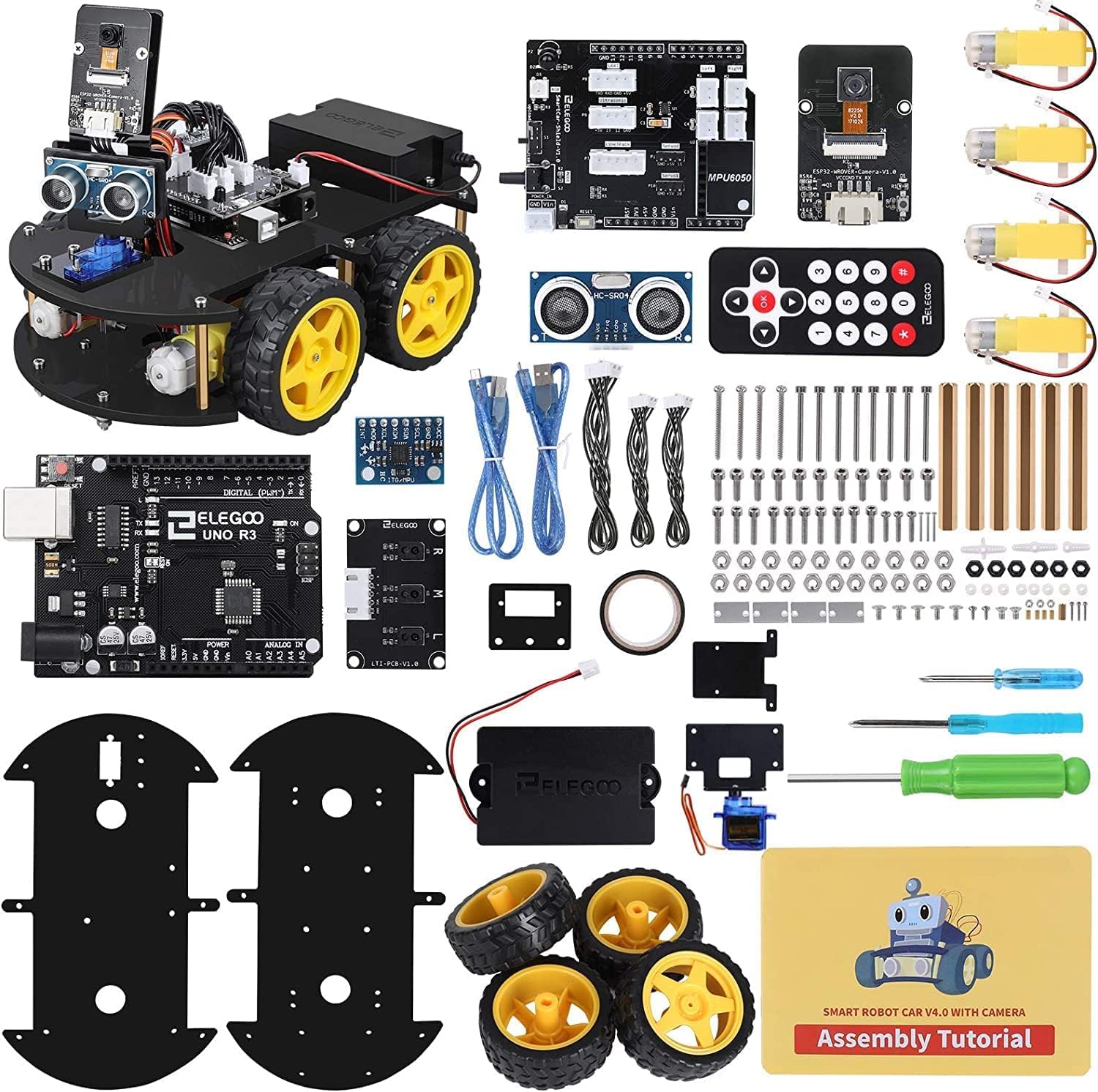
🚗 Code, Control, Conquer: Your Smart Robot Journey Starts Here!
The ELEGOO Smart Robot Car Kit is a premium Arduino UNO R3-based educational STEM kit designed for ages 8 and up. Featuring WiFi and infrared remote control with FPV camera, 24 modular components, and easy-to-follow HD tutorials, it offers a hands-on introduction to programming, electronics, and robotics. Its robust aluminium and perspex build ensures durability, while the versatile design supports multiple modes like obstacle avoidance and line tracking, making it a perfect gift for aspiring tech enthusiasts eager to build, code, and innovate.









| ASIN | B01M6YHRJ4 |
| Assembly Required | Yes |
| Batteries | 1 Lithium Ion batteries required. (included) |
| Batteries Required? | No |
| Batteries included? | Yes |
| Best Sellers Rank | 37,491 in Toys & Games ( See Top 100 in Toys & Games ) 3 in Robot Model Building Kits 492 in Educational Science Kits |
| Colour | Unable to Predict Color |
| Customer Reviews | 4.4 4.4 out of 5 stars (534) |
| Date First Available | 21 July 2023 |
| Delivery information | We cannot deliver certain products outside mainland UK ( Details ). We will only be able to confirm if this product can be delivered to your chosen address when you enter your delivery address at checkout. |
| Educational Objective(s) | Programming Skills, Electronics Assembly, Robotics Knowledge, Independent Exploration, Hands-on Learning, Creativity, Obstacle Avoidance, Line Tracking, Engineering, Design, Problem-Solving, Building Resilience, Flexibility, Initiative, Collaboration, Communication and Teamwork, Concept Development Skills |
| Item model number | EL-KIT-12 |
| Manufacturer recommended age | 8 years and up |
| Material Type(s) | Aluminium, Plastic |
| Number of Game Players | 1 |
| Number of pieces | 1 |
| Product Dimensions | 27.94 x 4.75 x 5.84 cm; 1.18 kg |
| Remote Control Included? | No |
D**Y
Arduino Based Smart Car, with a huge range of features :)
Teaching Artificial Intelligence at Undergraduate level and seeing many student projects involving Robotic Cars, I was curious what this Kit by Elegoo would be capable of for the money, and whether I could potentially use it for teaching purposes, or for helping my Children (6 and 8 years of Age) understand how these “SMART” cars work. So I was excited to get started with the Elegoo ROBOT CAR Kit (SMART) V2.0 when it arrived. Upon receiving the kit, I noticed how well made the box was that the kit came in (as shown in Figure 1). Having bought kit before from other manufactures wrapped in plastic, or just put inside a jiffy bag, it was nice to see this kit securely and safely housed inside a bright orange box. Upon opening the box, I was pleasantly surprised to see a very well packaged kit, with key components such as the all-important Arduino board wrapped in anti-static bags to prevent them getting damaged by electrostatic voltages. Also inside was a nice key to contents in the lid, and a CD ROM ready for me to use as shown in Figure 2. Assembling the Car Inserting the CD I opened “Lesson 0 Assemble The Car” and proceeded to build the car. The care took approximately 52 mins for me to build, and at times I had to double check the instructions as at times they were slightly unclear, but still 52 minutes to assemble the car seemed reasonable to me, I’m comparing this to a Lego Robot I built recently that took me 2+ hrs . The completed car can be seen in Figure 3. Making the Car Move Backwards & Forwards ************************** I started with the “Make The Car Move” tutorial but quickly realised the batteries supplied were flat, I’m not sure if I was a novice user I would notice that, but the car just won’t work if the batteries are not charged. So best to put these on charge when you first unpack the kit (You cannot use standard batteries). Also though it says in the lesson to unplug the Bluetooth module when uploading a program, it is very easy to forget to do this and as such the program won’t send to the Arduino. So I had to unplug the Bluetooth each time I wanted to upload a program. • So I charged the battery. • Opened up the Arduino program (Sketch) • Ran the sample code • Happily, the car quite happily moved backwards and forwards which was good • I pressed the rest button on the board when I had seen enough The lesson itself is actually very detailed on how the motor driver works and so is definitely worth a read. Making the Car Move Bluetooth ************************** I suspect me along with most users are going to find it long winded to get the .apk file from the disc onto the android phone, as such it would have been helpful to have put an app inventor QR code, an app inventor program or simply a google store application up for me to download. As such I skipped this lesson. Making the Car Move Infra-red. ************************** For this I needed to unzip the 2 libraries included “Arduino-IRremote” & “IRremote” and put them into the libraries folder of the Arduino software on my PC. After running the software, I realised the car moves quite quickly as such, it would be really helpful if the example code made the car move a lot slower, which is easily possible, but less so for a novice user I noticed that unless the remote was pointed exactly at the infrared receiver, I got some random results and nothing seemed to happen, I found this out by opening the Serial port on the PC and watched what was happening. Making the car move obstacle avoidance ********************************** I uploaded this to the car and put a bin in front of the robot, nicely it scanned, backed away, but then carried on backwards. I can see what it is trying to do, and It’s a Robot Kit so I’m happy to experiment with the software to get this to behave the way I think it should, but It would certainly have put off other users. So My Final Thoughts. ****************** I have lots of robots from the toy shop that work as I would expect out of the box, and they are fine to experiment with. But this isn’t a toy! It was a different proposition for me, I wanted a kit that I could build and learn from, a kit I could experiment with and be able to improve myself over time with code, and I think that is where this kit excels. If I was after something that assembled into a final car that just worked without any coding then this would be something I wouldn’t buy, but as an electronics, software, robot buggy development kit I really liked it. With some time and patience, it’s a lovely piece of technology for the adventurous electronics/robotic hobbyist to work with an Arduino based Robot Car. Sure the instructions could be improved on for assembly, the speed could be reduced, and an App could be available on the Android store to make it easier to control, but they are things I can do myself, and do quite easily with a little experimentation. Debugging is easy if users are happy using the Serial Window in the Arduino Sketch, and it would be good to see a tutorial to allow users to work through an example in case the car doesn’t work. Overall I would recommend this to a friend, and even get a few more to see if they could work together. The kit is controlled by the Arduino Uno, and this is an excellent embedded board to learn on as it is very versatile.
T**E
Extremely well made
I’ve been wanting to make one of these self balancing robots for a while and when I saw this kit I decided to get the kit instead of buying the individual components and trying to design and build something from scratch. After my experience with this I might still do that as this didn’t quite give me the challenge I was looking for! Pros. 1. The packaging is brilliant, very neat and logical with good sturdy ziplock bags fir the screws and other components, well labelled and organised. 2. Very easy to put together, I’ve also listed this as a con because depending on your skill level you might just find this too easy! It took me an hour and a half while watching the news! 3. All of the components are well made and highly accurately drilled, everything lined up perfectly. The bottom base where the motors attach is anodised aluminium and the other flat decks are good quality clear Perspex, with protective paper on both sides. 4. Good clear instruction manual backed up by an excellent video on YouTube. 5. Well designed. It’s actually pretty hard to put this together incorrectly, even the boards are reversible so there is virtually no chance of getting things back to front. 6. The finished article looks fantastic, loads of leds which change configuration depending on the mode it is in. 7. Several modes such as follow, avoid etc. 8. The App (I use IOS) is well written, paired with the robot first time and works very well. The joystick control can be a bit tricky to use but I’ll put it down to an inexperienced operator. Cons 1. If you are skilled with electronics and looking for a project to keep you busy this is unlikely to keep you occupied for very long. This is being really picky as Elegoo are aiming this at all levels. 2. There is a remote control button that “should” make the robot stand if it’s lying on its plastic support, this just does not work for me. It’s something I will play around with as it could easily be to do with the surface it’s on or just simply weighting, I.e. if some weights are added to strategic places it might just work. 3. The proximity sensor works but is not fantastic and makes the follow mode a bit hit and miss. 4. The biggest negative for me is the battery compartment which lies between the top two Perspex “decks”. In order to get the batteries out to charge them you have to undo and remove 3 screws and loosen the fourth in order to swing the entire perspex deck aside to access the battery compartment. The screws are very small and fiddly and could be easily lost (there were a couple of spares in my kit). A simple way around this would have been to provide knurled thumbscrews for this top deck, perhaps incorporating a captive design so when they are undone the remain attached to the perspex. In summary this kit is made from quality components, well designed and well packaged, I’ve had one or two other items from Elegoo so I was expecting good quality and I wasn’t disappointed. So despite the cons I’ve listed this is excellent value for money and a really cool project that will be fun to get out at a party or when the family comes to visit - if that ever happens ever again!
Trustpilot
2 months ago
1 month ago