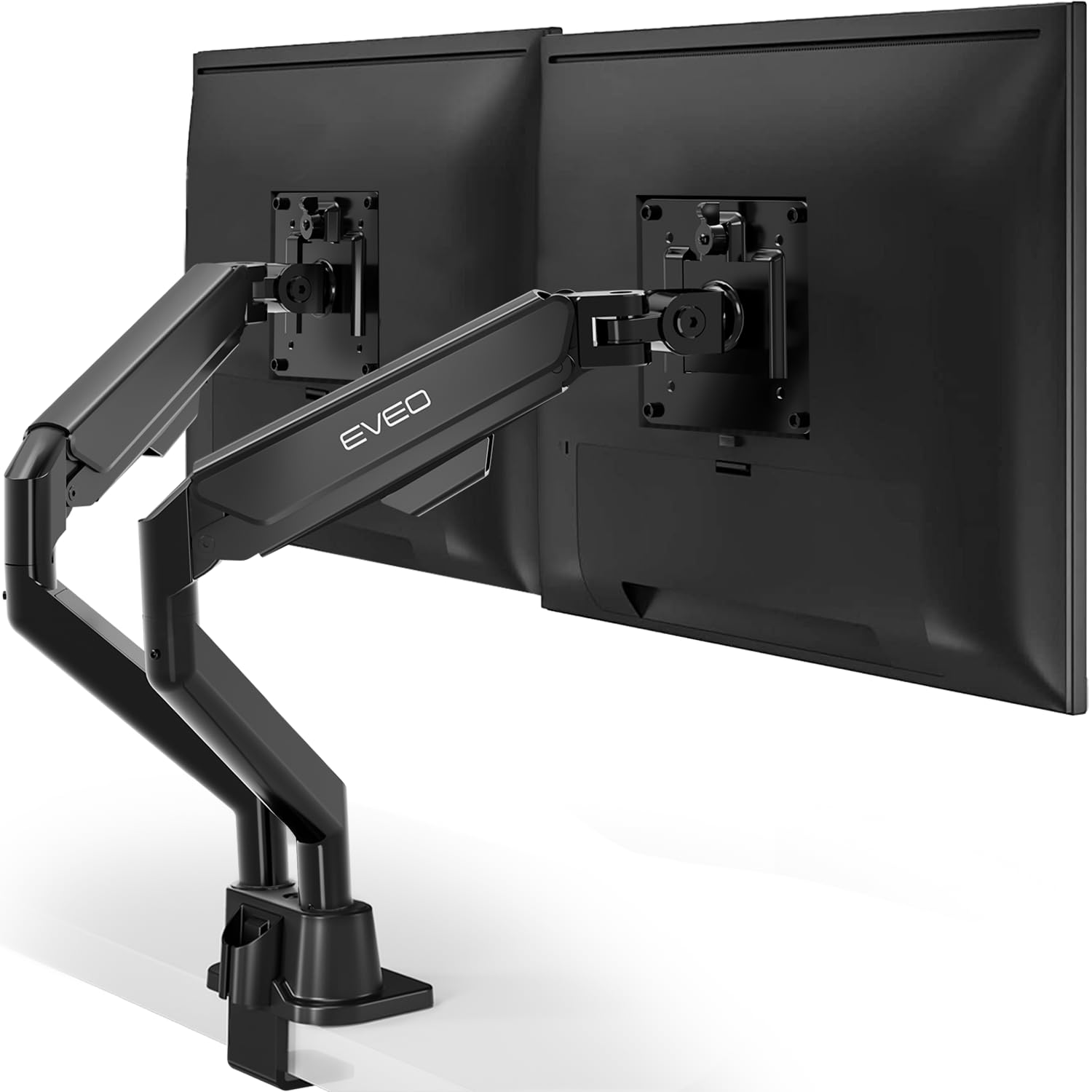
🖥️ Elevate Your Desk, Elevate Your Game!
The EVEO Premium Dual Monitor Mount supports 14"-32" screens with VESA compatibility, offering quick 5-minute installation via clamp or grommet. Featuring 360° rotation and ±90° swivel, it ensures ergonomic comfort and flexible viewing angles. Built from high-quality materials with a sleek black powder coat, it combines durability with a clean, organized workspace ideal for professionals seeking productivity and style.



| ASIN | B07V1J81FB |
| Best Sellers Rank | #102 in Computer Monitor Arms |
| Brand Name | EVEO |
| Color Name | Black |
| Customer Reviews | 4.4 4.4 out of 5 stars (5,063) |
| Date First Available | September 28, 2019 |
| Item Weight | 8.49 pounds |
| Item model number | Dual Monitor arm |
| Package Dimensions | 17.04 x 11.61 x 4.88 inches |
J**M
Premium build quality, good design, cable management needs a bit of work
• Amazing clamp mechanism with the bolt on the top used to tighten the otherwise flat and padded C-clamp which made installation much simpler for me, as I needed to cut a slot in my desk to do the clamp. Having that be flat instead of bulky was great. A+ design, it was one of the major reasons I picked EVEO! • Arms are sturdy and all the metal is thick and high quality. Great powder coat. Overall very high quality fit and finish with good attention to detail. • Love the big sturdy tool for tightening the bolt for the clamp. I wish it had been an all-in-one tool that handled every bolt or screw on the entire unit for simplicity, but I still loved the size and quality of the tool and the slot to keep it on the back of the base so I don’t lose it. I’d also have liked it painted black to blend in when slotted back there. • Love the included Velcro ties! • Love the thumb screws, on the VESA mounts! The not as good: • Cable management space in the lower arms could use a bit of improvement. I wish they had a little more space and the sliding mechanism, which inexpensive, reliable, and good looking doesn’t allow the smoothest interaction trying to add or remove cables especially if you have many of them. I think something could be done to improve this whether it’s adding a bit of depth to the plastic to give more interior space or redesigning it as a whole with a hinge or some other closing mechanism. Your stuff will still fit but with a bit of force. • The cable management plastic piece on the upper arm comes off the arm too easily. I’d also like to see a second tie down for cables on the upper arm. • The cable management plastic piece on the base slides out very easily. I expected it to clip in but it doesn’t seem to. • I had to tighten the allen screws holding the VESA brackets to the plastic slides (the ones that say TOP with an arrow) because they came quite loose with a lot of play. I did like that they took the same wrench as the rotation lock mechanism set screws. • The rotation lock mechanism is not great and even tightened down I can’t really get it to lock. I think this could use improvement, though it’s only a minor thing for me. Overall it’s a 9/10 for me and I’d recommend it to anyone looking for a sturdy monitor arm but doesn’t want to pay $300.
K**O
Quality and Clever Construction
I don't often write reviews, but this product's quality surprised me so much that I began drafting one as soon as I received it. It's now been over a week and nothing has happened to make me question its longevity so far. Pros: The quality feels sturdy. The design is very smart. Clearly whoever developed it really thought about things a monitor arm should and could have to make adjustments easier while creating clean lines and stability, and was able to provide that at a very reasonable price. It comes with a bunch of extra parts so you can customize your installation. There are options for how permanent the installation is, and conveniences like thumb-screws, nice velcro cable ties, and probably my favorite of all, an easy-detatch VESA mount that holds securely but allows the monitor to come off the arm by pushing one tab. The whole thing is attractive and attaches firmly to the desk (my desk is only about 3/4" thick). Having the tightening screw on the top, adjustable with the substantial allen key provided, is very easy. The lower part of the arms have a slot for the cables to hide in, and given that in my experience this is usually the part of an arm that doesn't work as well as it should, and ends with broken plastic and exposed cables, I think this arm solves it in the best way I've seen. It takes a little work to get the cover to lock fully in place if you have a lot of cables, but once together it's secure and very clean-looking, and I've had to do a lot of cable swapping while getting my setup just right, and it hasn't broken or made me dread readjusting it. My monitors weigh 10 lbs and I didn't need to adjust any tension to get them to stay in place, so I can't comment too much on that process. One temporary Con: one of the lower sections of the arms wouldn't pop onto its mounting point on the base until I sanded the inside down a bit.
M**M
Easy to set up, then set and forget.
I was looking for a high quality but lower priced alternative to a Dell dual monitor stand and this popped up as an Amazon recommended option. It has been excellent. The box it arrived in is very high quality and the custom Styrofoam inserts hold everything securely but also make it easy to unpack. No extra tools are required - everything is included along with 2 monitor mounting options. The easy-to-use plastic thumbscrews were the ones that matched my Dell P series monitors. The instructions were clear and easy to follow and printed on high quality slick paper. I had to make an adjustment, though. The Dell P series monitors' VESA mount screw holes are recessed. If you try to attach the VESA adapter before placing the monitor on the arm, you'll find the recess is too deep and prevents the adapter from sliding on to the arm. You have to attach the VESA adapter to the arm first and then attach the Dell Monitor. It's a little awkward to hold the large monitor and screw it on to the arm at the same time and you might want to get help. Luckily the thumbscrews with the large plastic screw top make this somewhat easier. I can't imagine trying to use a screwdriver while I'm holding the monitor. Once the monitors are mounted on the arms it's very easy to adjust the height and position so the monitors stay just where you want them. The supplied combination Phillips screwdriver/hex wrench is the tool to keep handy - it fits all the adjustment points. The adjustment points have directional stickers on them so it's easy to see which way to turn for increasing or decreasing tension on the arm. No guessing! Since setting it up I have not had to adjust it. The monitors seem to float exactly where I want them. Set it and forget it! As an IT professional who has installed many different types of monitor and TV stands, I highly recommend this one. (Pictures show (1) both Dell Monitors mounted, (2) position of arms and stand on back of desk and, (3) closeup of the VESA mount in the Dell VESA recess.)
J**B
Stevige steun, makkelijk in elkaar te zetten en te monteren
R**S
El soporte cumple con su funcionalidad de tener 2 monitores, yo utilizo 2 monitores de 24” el cual es difícil ponerlos juntos sin estar cerca de mi, tuve que optar por una configuración horizontal y vertical para poder trabajar mejor. Como referencia para México lo compré en $789 (40us) creo he fue un excelente precio. Cosas que me gustaron es que es muy amplio la apertura para sujetar del escritorio y trae otra placa por si quieres ponerlo fijo en la madera ranurando.
J**.
The product was fine and sturdy and worked, but I don't know why I paid 180 dollars for it. Maybe they just ripped me off and I bought it when the price is high. but I think there are much cheaper alternatives.
M**I
The screws did not tighten well on the base and could not hold my 27 inch monitor
A**R
I've been looking at a few different monitor arms and bought this one. Pretty happy with the build qulity and it's functionality.
Trustpilot
2 weeks ago
1 week ago



