We remain fully operational. Our teams are working around the clock to ensure your deliveries continue safely.

DOWNLOAD THE APP


Customer Services
Copyright © 2025 Desertcart Holdings Limited
DOWNLOAD THE APP


🚀 Tiny adapter, giant Wi-Fi power — never miss a beat!
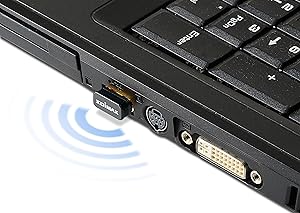
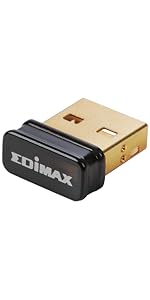
The Edimax EW-7811Un is a nano-sized USB wireless adapter supporting IEEE 802.11b/g/n standards with speeds up to 150 Mbps. It offers up to 3 times the coverage of legacy 802.11b devices, smart power-saving features, and a user-friendly multi-language setup wizard. Compatible across Windows, Mac, and Linux, this ultra-compact adapter delivers reliable, high-speed wireless connectivity in a near-invisible form factor—perfect for professionals who demand seamless internet access on the go.



| ASIN | B003MTTJOY |
| Batteries | 1 A batteries required. |
| Best Sellers Rank | #2,076 in USB Computer Network Adapters |
| Brand | Best Price Square |
| Color | Black/gold |
| Computer Memory Type | DDR3 SDRAM |
| Customer Reviews | 4.3 4.3 out of 5 stars (17,236) |
| Date First Available | December 3, 2010 |
| Is Discontinued By Manufacturer | No |
| Item Dimensions LxWxH | 5.5 x 3.5 x 0.7 inches |
| Item Weight | 0.96 ounces |
| Item model number | EW-7811Un |
| Manufacturer | Edimax |
| Number of Processors | 1 |
| Number of USB 2.0 Ports | 1 |
| Number of USB 3.0 Ports | 1 |
| Operating System | Windows XP / Vista / 7 / 8 / 8.1 / 10, Mac OS 10.7 ~ 10.13,Raspberry Pi & Pi 2, Linux Kernal 2.6 ~ 4.4 |
| Product Dimensions | 5.5 x 3.5 x 0.7 inches |
| Series | EW7811Un |
| Wireless Type | 802.11b, 802.11g, 802.11n |
D**N
Low expectations, fantastic outcomes so far
I really was expecting these to be a failed purchase. I thought I'd give them a go almost as a novelty... I feel silly now, as they are brilliant. Driver dependency is heavy, don't expect to just plug them in and go as some of the larger clunkier ones would allow with onboard drivers or the ability to use generics. But really it would be kind of giddy to assume otherwise with these things that are so small as to seem unlikely to be effective in any real-world applications. I would do a pro / con, but have no cons.... Perhaps because I just expected the worst, leaving me with nowhere to go but up. - Size: Tiny - I can *almost* close the USB flap on a Dell Duo Convertible with the thing in. I would forget they were in a USB hub if not for the flashing LED. They are practically nonexistent in a tower USB port, front or back. - Reliability: I have used them in odd situations, and have yet for them to be the source of an issue. Mixed NIC environments present the usual hazards, but nothing additional that I've noticed. - Range: Again, I have had low expectations, and so I used them mostly so close to the wireless source that I couldn't judge fairly. They have fit the bill at 25+ feet from the nearest active AP handily. Walls and obstacles have not buggered the connectivity. That's more than I would have expected, your situation may differ. - Price: Cheap, especially considering the awkward situations that they can be used to resolve temporary issues and the time sink potential in those situations if you don't have a quick-and-dirty answer. I will likely keep a small stack of them around indefinitely. So far I have used these in scenarios like: - Emergency connectivity for DNS server mishaps on domains - A replacement for troublesome hard-connections in nearby Win 7 64 workstations - As a makeshift NIC array via a USB hub for Windows 2008 R2 Datacenter servers requiring multiple connections but lacking the hardware - Onboard fail-safe connection (by pluging one into the unusually placed USB slots on Dell and Supermicro server boards, just leaving them there,disabled or otherwise inactive, just in case all other options are bunk) - Near invisible wireless connections on Netbooks, Dell Duo Convertibles, Legacy laptops. I can't attest fully to their cross platform usage yet. But I have several unusual server and wokrstation builds across the SUSE and Ubuntu spectrum that I will certainly be giving them a test on. I have a pretty fair expectation that as long as the drivers install as expected, they will be effective there too... I have used them as a guest captured NIC for Linux and Windows virtual appliances and servers with some success, but as there is a significant abstraction layer there, that doesn't seem like an overall statement about their usage in a standalone environment. So this is one of those times when a shot-in-the-dark actually has paid off in volume... I would (and will) purchase more of them, either for specific applications or more likely as a brilliant addition to my "what if" toolset. If there is a downside, I haven't found it yet...and I have used them in some pretty weird circumstances so far... There may well be better out there, I just stumbled on these, didn't really invest in thorough product research. I grabbed some of these along with other variant wireless and USB NICs for emergencies and peculiar issues. These are the ones I have used almost every time. The rest of that collection of variants remain safely boxed on the shelf.
L**R
Windows-10 Software Updates That Work!
I recently upgraded my old Windows-7 laptop to the “free” Windows-10 promotional offered from Microsoft. Even under Windows-7 the WiFi interface had been problematic and the issued continued under Windows-10. Given the advanced age of the laptop, I didn’t want to invest a lot of money fixing the WiFi. In reviewing Amazon’s USB WiFi solutions, the Edimax EW-7811Un appeared to be likely low cost solution were it not for the large number of negative reviews which were offset by the still larger number of positive review. I decided to take a chance and ordered the Edimax EW-7811Un. When the Edimax EW-7811Un arrived, I was able to use the default Windows-10 and Mini CD-ROM to install the driver and support software; however, neither solution worked for longer than several minutes before failing. Most troubling was that the Edimax EW-7811Un “ALMOST” worked. When I read the current product reviews, as they pertain to Windows-10, I realized that my experience was not unique and there were a number of unhappy people who ordered the Edimax EW-7811Un for use with Windows-10. In reviewing several USB WiFi solutions on Amazon, I noticed that the Windows-10 upgrades were more problematic. This could be caused by (1) older and slower hardware or (2) the Windows-10 upgrade image was not quite the same as a native Windows-10 image. For several days I considered writing a scathing review while devising alternative solutions but kept returning to the fact that the software was almost on the cusp of working. Finally, I called the Edimax support number, expecting technical support Hades, only to be quickly connected with a knowledge support technician. When I described the problem, the technician indicated that the wrong software was being distributed for Windows-10 and provided guidance on where to find the correct software, which was not on the primary Edimax website. As Amazon doesn’t support the posting of URL’s, the following navigation is provided on where to find the correct software: Navagation: edimax.us | support | download drives On the “Driver & Manual Download” page, go to Section 7 and download the ZIP compressed driver EW-7811Un Win v1.0.1.4, which is the first entry in Section 7. I used a tablet to download the file EW-7811Un_Windows_driver_v1.0.1.4.zip and then transferred the file to Windows-10 using a USB interface. Un-ZIP the file, using Windows-10, and then run the program “Setup”. This not a GUI and runs under a DOS shell, so just wait until it completes. As Edimax Support recommended, reboot your Windows-10 system, and you should be good to go! A few off-the-cuff observations: (1) A built-in laptop WiFi generally has a hidden and sometimes large antenna under the case. The Edimax may not work in WiFi marginal areas of your home. There are Edimax products with large external antennas but these will not have the small form factor of the Edimax EW-7811Un. If the connection is very poor the Edumax is flagged as “Turned Off” and you may have to use Windows-10 to re-enable the WiFi. This could be a bug! (2) I noticed that the Edimax EW-7811Un sometimes appears to go to sleep. Turning Device “Power Management” OFF may correct that problem. I have now run a four hour series of serious stress tests and, with the exception of marginal areas in my home, the Edimax EW-7811Un has performed well. I am giving this product “Five Starts” because of the good performance at a very affordable price point. Yes, Edimax’s software quality control was troubling in this case, but I would give their Technical Support “Six Stars” without a second thought. Microsoft Windows-10 upgrade policy was highly innovative and has given new life to older hardware and after market upgrades such as the Edimax EW-7811Un. Edimax and Amazon have to do a better job of communicating the good news to their customers.
D**D
Compré este USB wifi para añadir funcionalidad wireless a mi RPi. Funciona perfectamente en las distribuciones que he probado: Raspbian, XBian y Openelec. Puntos a favor: - Funciona directamente sin necesidad de instalar drivers ni tocar demasiadas configuraciones (en las distros que he probado) - La velocidad és muy aceptable, se puede reproducir videos a 720 por streaming desde otro PC via wifi y no hay saltos (obviamente, en mi caso no había mucha distancia ni paredes por medio). En contra: - Nada me viene a la cabeza ahora mismo
M**M
Bought it for my Raspberry Pi. Works fine right out of the box on 2.4 GHz. The size is very small, doesn't obstruct other ports. The dongle gets only slightly warm (<40C), so the power consumption shouldn't be too bad. Speed seems to be ok, but I've only tested it up to 3 m away from the wifi access point. With this size and the lack of an antenna I wouldn't expect much range. P.S. I've tested the transfer rate over SSH. With the dongle positioned 3 m away from the access point I got approximately 30 Mbit/s. I suspect it's my Raspberry Pi that is the bottleneck in this case. P.P.S. If you are going to use this adapter with a Raspberry Pi, don't forget to turn off power management, otherwise the adapter will fall asleep during periods of inactivity (not ideal when you are using your pi as a server) Enter: sudo nano /etc/modprobe.d/8192cu.conf And add the following lines: # Disable power management options 8192cu rtw_power_mgnt=0 rtw_enusbss=0
Y**E
Product is easy to use. I bought it to be used with my Hackintosh on mojave even though it's not yet supported by drivers offically, but yea it works awesome and for Rs.449 it's a steal deal. As of now highly recommend and bindas go for it. Nice work edimax 🙂
C**O
Me funcionó perfecto para un Hackintosh con Mac OSX sierra 10.12.6, ese era el fin así que quede satisfecho, talvez no tiene mucho alcance pero está bien por el precio, por ejemplo yo tengo mi PC a 8 mts rectos de el router solo separados por la pared y la puerta de mi cuarto y de t rayas me daba 4 o Aceves 3 y mi velocidad de 20mb me daba comon15 o Aceves que estaba raro hasta 3mbs, pero es razonable por qué es tamaño mini y por precio cumple en conectarte.
C**N
Bonjour, Acheté pour placer sur un Pi2. Au niveau driver, il fonctionne sans problème et, est directement reconnu par l'OS Raspian, je n'ai fait aucune manipulation. Si vous branchez le Pi2 sur votre LAN en filaire (eth0) et en wi-fi (wlan0), vous recevez logiquement 2 adresses TCP-IP de vote routeur. Je dis ça c'est pour votre accès distant via ssh ou vnc par exemple où l'adresse va changer en fonction que vous utilisez le câble ou le wi-fi. Test concluant effectué: 1) mon pi2 est démarré sur le LAN en filaire via le connecteur RJ45 2) je me connecte sur le Pi2 via VNC Viewer avec l'adresse TCP-IP de la carte eth0 3) de là, je me connecte au wi-fi après avoir indiqué le mot de passe d'accès à mon réseau sans fil. 4) j'arrête mon Pi2 via un terminal en écrivant "sudo halt" 5) j'enlève mon câble ethernet du Pi2 5) je redémarre le Pi2 6) il se connecte sans problème via l'adapteur wi-fi 7) je peux attaquer ma machine via VNC Viewer avec l'adresse TCP-IP de la carte wlan0 Conclusion: très bon produit, il se connecte en natif sans manipulation ou ligne de code sur le Pi2. Pas de problème non plus, de reconnexion sur le réseau wi-fi suite à un redémarrage du PI2. A recommander. BàV Nicolas
Trustpilot
2 weeks ago
2 months ago