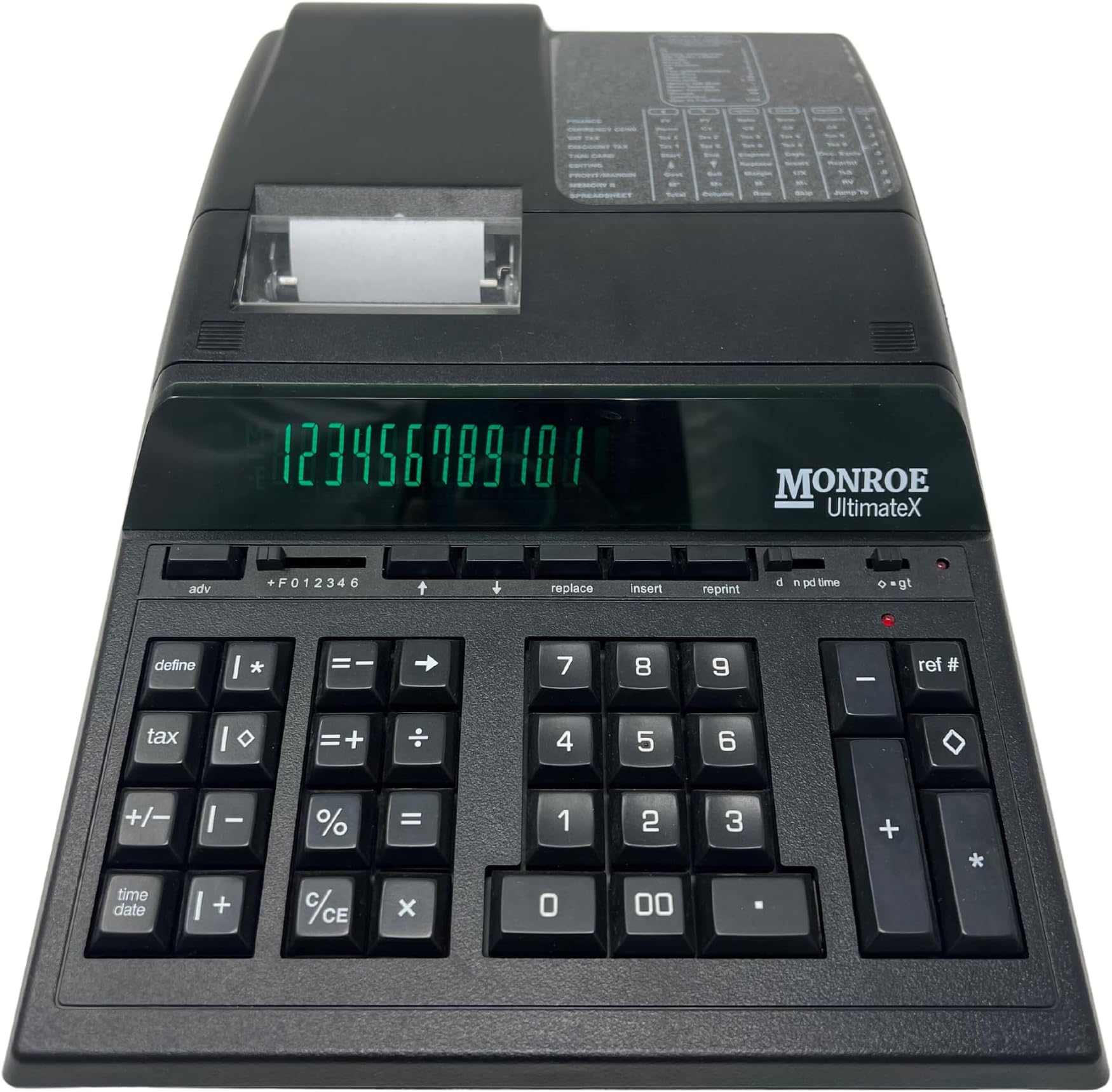
This is a traditional 12-digit business ten-key calculator with some advanced features. It is described as a heavy-duty calculator, meaning it is AC plug in only, meant to sit in a fixed location on a desk, has a fast (5 lines per second) printer, and is expected to last at least several years with frequent daily use. Monroe is a small private company with a specific design philosophy: * Make the machine last as long as possible * Design out error, waste, and user friction * Separate the adding machine from the fancy features * Eliminate hidden states * Set reasonable defaults and provide a lot of custom options This machine has a green vacuum fluorescent tube display, and the printer has a character wheel for each digit position. The keyboard does not use clicky mechanical switches like a gaming keyboard, but rather is optimized for a light touch. The keyboard feel is very good and I have not seen any missed or duplicate keystrokes. Monroe has put a lot of effort into the keyboard touch and print quality. The display font is attractive and easy to read. The printer uses a cloth cartridge ribbon that can be changed without getting ink on your hands. You can also use the older two-reel ribbon, but the cartridge is nicer. The calculator is longer than most, due to having its paper roll inside the case to keep dust out of the printer. There is room in the case for a spare paper roll and ribbon. The right side of the keyboard is a normal adding machine. Digits, decimal, plus, minus, total, subtotal, and ref# (print a set of digits without adding it to the total.) There is a switch for decinal places. The + position automatically treats the right two digits (by default, adjustable) as cents, so you don't have to press the decimal point. F is floating point, and others are fixed point. Business ten-key logic applies: enter a number, press + to add or - to subtract, press diamond to print the total so far, press * to print total and clear the accumulator. So you do 10 + 2 + 7 - * (prints 5 and clears) rather than 10 + 2 - 7 = as you would on a pocket calculator. The three-mode "gt" switch lets you choose to either display the last number entered while adding, display the running total, or display the last number entered and accumulate a grand total. There is no dedicated grand total key. Pressing subtotal twice prints the total and grand total. Pressing total twice prints and clears the total and grand total. The switch labeled d-n-pd-time has four modes: display only, print with item count, print without item count, and print with time arithmetic. The item count prints in red on the left, three digits, and you can even set a starting count to increment from. I tested a four-digit starting count and the machine handled it. Time arithmetic adds and subtracts hours-minutes quantities. There is a separate time of day summing mode unrelated to this switch. There is a red light near the adding machine cluster, which lights when there is a nonzero number in the accumulator. There is another red light near the gt switch to indicate a number in the grand total register. The total key turns these lights off. Most people clear an adding machine every time before using it. The lights tell you if you need to clear the machine, eliminating a hidden state. The machine also prints a C next to the first + in an addition so you can be sure the machine was zeroed. The top row has a paper advance button, and five editing/function keys which redefine to perform a variety of other functions. The editing functions let you scroll through a chain of additions and subtractions, insert or replace numbers, and then reprint the whole chain up to 99 lines. The printer can be set to automatically feed above the tear off point when you press total, or you can turn that off and use the manual advance button. The machine prints subtractions and negative numbers in red. Of the four cases: add postive number = black. Add negative number = red. Subtract positive number = red. Subtract negative number = red. Pressing - immediately after an erroneous + (without a number entry) is special-cased to also decrement the item count. The middle cluster has X, divide, and equals. You enter 12 X 7 = and get 84. You can then press + to add the 84 to the accumulator. Or you can use the =+ and =- keys: enter 12 X 7 =+ to add 84 to the accumulator. The logic here is, if you are adding up an invoice, you can do 3 items X 0.75 each and press =+ to add the total price to the bill. Pressing X = squares the number. Divide = is square root, which most ten-keys cannot do. The C/CE key clears a faulty entry in progress, but does not clear the accumulator. The right-arrow key deletes one digit entered. The % key completes a multiply or divide as a percentage, i.e. 50 X 20 %. You can also press + or - after the percent to generate a mark up or mark down, without affecting the accumulator. The next row to the left is independent memory, which behaves just like the main accumulator. There is an M in the display when it is in use. There is a second memory which can be assigned to the five top row keys, and that one displays a dot in the display when in use. There is a two-column add mode which lets you use the grand total with =+ and =- keys as a third independent accumulator. So you can have up to four add-subtract chains going at once, each one having its own item count, subtotal, and total. This is first and foremost an adding machine. The leftmost row has the tax key, which is like a percent key with memory. This same function is known as mark-up on some machines. You set a tax rate, and can then enter a number and press X tax to get the tax amount and total with tax in one operation. I tried a negative percentage and it does deduct as you would expect. The plus/minus flips the sign of an entry, and also indicates PM in 12-hour time math. The date/time key can set, display, or print the date and time. There are 12 and 24 hour clock options, and date format options. If you leave the date and time on the display, it will update every minute and function as a nice-looking desk clock. There is a power switch on the right side. Power consumption is 5 watts while not printing. There is no screen saver on this machine; the display stays lit. The manual warns that leaving the machine on all the time will eventually degrade the display brightness. These calculators are used in casinos where they are powered on 24/7, and are said to last several years in that role, so leaving it on during a workday should not be a problem. The define key lets you enable a long list of modes and options. The machine prints an indicator in black when a mode is turned on and in red when it's turned off. There is an option to print all the mode settings, and a clear to defaults. There is a time clock mode where you can enter start and end times of day and get a total hours and minutes. If you press + or X, the hours and minutes will convert to decimal hours so you can calculate wages. This mode also does calendar arithmetic, providing days between dates, and date plus days. It does handle leap years, but does not display day of the week. This machine has the five-variable Time Value of Money solver, like an HP-12C's top row. It can solve for any of the variables, and agreed with a 12C to the penny. This is probabaly the only line of printing ten-keys that can do that, and must have required a lot of math functions that are not otherwise required in a ten-key. The mode can even print out month by month amortization tables. The machine has a "crossfooting" mode that is supposed to accept a rectangular grid of numbers and calculate various totals and percentages. I have not figured out how to use it yet, and the manual could explain this feature better. There are several tax rate, currency conversion, and cost/price/margin functions. There are some automatic summing modes, for example, sum the first number of each multiply or divide. Selecting a mode with define changes the functions of the five top row keys, and sometimes other keys like =+ and =-. There is no "shift" key like the f and g keys on a HP-12C. Each key only does one thing at a time. There is a label to the right of the printer that shows most of the modes and the alternate function key definitions for each one. If you want a high quality desk calculator that will last a while, and has features not found on most ten-keys, this line of machines looks to be the best. It is a pleasant machine to use. If you previously hated balancing your checkbook, you will now be looking for things to add up. I have already audited my monthly expenses while playing with the calculator, and learned a few useful things in the process. I have put this machine to the test with various edge cases, and found them already thought through and handled. There are a couple of other calculators on the same hardware platform, one of them a simpler 14-digit machine. The UltimateX is the fanciest in terms of special features, specifically the edit and reprint. The machine comes with a dust cover, ribbon, paper roll, and manual. Too bad Monroe doesn't make a PC or a smartphone. Their products are more user friendly and better thought through than most of today's information technology. The company provides live human support, too. I asked a question in the notes field of an order, and got an answer in email.