🛫 Take command with precision — fly like the pros, feel the difference!
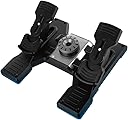
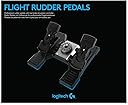
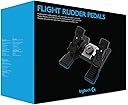
The Logitech G Saitek Pro Flight Rudder Pedals deliver professional-grade, self-centering rudder control with 2000-point precision and adjustable tension. Featuring differential toe brakes for independent left/right braking, these pedals offer customizable responsiveness to suit any aircraft type. Designed for seamless integration with flight yokes and VR setups, they provide an immersive, realistic flight simulation experience trusted by enthusiasts and pros alike.

| ASIN | B01MQ0N57Q |
| Are Batteries Included | No |
| Batteries | 1 Lithium Ion batteries required. |
| Best Sellers Rank | 2,249 in PC & Video Games ( See Top 100 in PC & Video Games ) 3 in PC Flight Controls |
| Brand | Logitech G |
| Colour | Black |
| Customer Reviews | 4.4 4.4 out of 5 stars (1,835) |
| Date First Available | 20 Oct. 2016 |
| Guaranteed software updates until | unknown |
| Hardware Platform | Desktop |
| Item Weight | 2.35 kg |
| Item model number | 945-000005 |
| Lithium Battery Energy Content | 2 Kilowatt Hours |
| Lithium Battery Packaging | Batteries packed with equipment |
| Lithium Battery Weight | 2 Grams |
| Manufacturer | Logitech |
| Number Of Lithium Ion Cells | 5 |
| Number of Lithium Metal Cells | 5 |
| Operating System | Windows |
| Power Source | Corded Electric |
| Processor Count | 1 |
| Product Dimensions | 31 x 40.3 x 16.8 cm; 2.35 kg |
| Series | X52 Professional Hotas |
| Standing screen display size | 15.6 |
F**S
Good pedals, precise, accurate, responsive - adds a whole new level to simming of all kinds.
Never owned pedals before, just used a twisty stick to control rudder in my air-sim type games. I flew solo back in the day, and had experience in flying various light aircraft including a glider, and once these were setup properly with my VR headset, and stick, it just brings it all back for me. Sure you don't have the vibrations, the smells, but this is as close to being there, short of being there once setup. They also work well for driving games, minus a clutch, because they not only slide side-to-side (that's the rudder control) but you can also press them down individually (toe brakes in aircraft control, but easily accelerator/brake in a car/lorry/bus type sim). I have used them in eurotruck2 to do just that, and they work great. So there are 3 axis here in total, the left/right slide, left toe brake, right toe brake. Every game allows for complete customization of each of these axis to control any given function/control in the game. You could configure the slide to be used as the accerlator and the right toe brake as the handbrake if you really wanted to - although i'm not sure why - but it shows you can do what you want with each axis. They are very responsible, as far as I can tell, at least in my usage, each axis has 2000 "points" of granulation from each extreme left/right or up/down. That means very smooth control in every way, and having used them for a few weeks now, they are as precise as when I first got them - very important. The software that comes with the download also allows you to adjust the "curve" of the responsiveness, so they can be made less sensitive or more sensitive at different stages of physically pressing them. While at first this may sound like a minor bit of a gimmick, it's actually very very useful, for example, rudder - a perfect example. While not strictly realistic, I find having the rudder a little less responsive for the first 25% or so, allows for much finer/greater very minor adjustments in flight, and therefore the final 50-100% probably controls 70% of the total movement, which is reserved for more extreme manoeuvres, but each to their own, i thought it's a good addition and used it within a few days. There is no force feed back, and if there was a way to improve these - that would be it. There's a big dial in the middle to turn to adjust how hard you push to get the pedals to move side-to-side, it just depends on preference and/or how hard you rest your feet on them when not wishing to press, but the quality of the product is good, thanks.
T**O
Good item easy set up
Q**R
Aids immersion by 100%
The first set was sent back as the box was damaged and some parts were missing. The replacements were delivered promptly. Set up was a breeze - these are essentially plug 'n' play in MSFS 2020. Had some initial trouble getting used to these. You need to make sure that they can't move, as a lot of pressure needs to be applied to both the rudders and the toe brakes - the supplied velcro strips will help with this, as does a solid backplate (I'm using a storage box) to ensure there is no unwanted movement. Took a while to get used to using the pedals, but they certainly aid immersion. There is a tensioner ring in the centre which you can adjust to get the feel just right for you. Not perfect - I'd like force feedback, but it simply costs too much. For what they are, these are a relatively cheap but worthwhile option.
R**N
Excellent performance and precision
This review is for logitech pro flight rudder pedals. I bought these as an upgrade to the thrustmaster t-flight pedals I had previously been using, for use in IL2 Sturmovik battle of stalingrad. To control an aircraft accurately, you need precise controls, and shooting accurately in a world war 2 aviation simulator demands good yaw control. I found some serious limitations with the thrustmaster product in that I found it difficult to find the center point naturally (by slackening your pressure on the pedals) and that the pedals (at least the ones I had) refused to move smoothly - they would jump as pressure was increased to move them from the center point (which also has an annoying "notch" that aggravates this issue). No such issues with the logitech product - smooth, precise movement, nicely widely spaced pedals, adjustable spring strength returns the pedals to the center smoothly, all in all a great product that has improved my flying dramatically. Well worth the extra money. Works great if up against a wall for extra stability.
W**F
No drivers needed, perfect tension. Great Rudder pedals
I bought this to replace an overly sensitive product to be used in DCS World. The pedals length is adjustable, the centrespot is easy to find and the tension is adjustable. There's a small, discreet powerlight too, so you'll know if it's connected. Ergomically this product is much more comfortable to use and causes less knee pain than more narrow units. It also comes with wall spacers which is a nice touch if you want to keep the depressed pedal action away from the wall. No drivers were needed, Windows 11 recognised the rudder pedals straightaway and DCS recognised the kit straightaway...so it was 'up, up and awaaaay!' Well done Logitech.
H**Y
Vraiment top ! Tres précis, je recommande
I**N
like in reality. I am using manz from LOGITECH products. They are compatible and as required. I am more than satisfied.
G**Y
Met deze rudder is mijn set up compleet. Dit is zoveel beter dan yaw op mijn joystick. Hoewel dit wel even wennen is.
K**R
Ich bin seit Einführung von x-plane 10 PC-Pilot für Airbus und Boeing. Bisher bin ich aber ohne Pedale geflogen, die Achsen hatte ich einfach auf den Joystick gelegt. Im Januar 2024 bin ich dann in Leipzig mal eine Stunde in einem echten Flugsimulator A 320 geflogen. Die Pedale benötigt man bei Start und Landung, um das Heckruder zu steuern und den Flieger auf der Landebahn zu halten, also zum Lenken. Der Fluglehrer hat schon bedenklich geschaut, als ich ihm auf seine Frage geantwortet habe, dass ich bisher keine solche Pedale für meinen PC besitze. Und natürlich hatte er Recht! Das Lenken mit den Füßen ist vollständig ungewohnt für mich gewesen. Erschwerend kommt hinzu, dass beim Kippen der Pedale jeweils das rechte und linke Fahrwerk abgebremst wird. Um es kurz zu machen: Hätte er nicht auf dem Pilot-not-flighing-Stuhl gesessen und tatkräftig eingegriffen, hätte ich den Flieger bei der Landung hoffnungslos von der Landebahn geworfen. Auf sein Anraten habe ich mir dann Pedale gekauft, meine Wahl fiel auf diese. Grundsätzlich müssen sie nur an den PC angesteckt werden, funktioniert unter win10 und x-plane 10 ohne Installationsmühen. Anschließend einfach im x-plane-Menü wie jeden anderen Joystick oder Schubhebel konfigurieren, die Pedale werden ohne weiteres Zutun sofort erkannt. Die Fußgröße lässt sich durch verschiebbare Platten an den Pedalen anpassen, Wiederstand ist ok. Allerdings muss man sie an die Wand stellen oder mit dem Boden verschrauben, sonst könnten sie verrutschen. Sollte der Abstand zur Wand zu groß sein, einfach ein Brett installieren. Wer sie verschrauben will, für den sind Schraubenlöcher angebracht. Die Pedale können zum Bedienen des Seitenruders geschoben werden, zum Ansteuern der rechten oder linken Hauptfahrwerksbremsen jeweils separat gekippt werden. Im Vergleich zum realen Airbus sind diese Pedale natürlich 3 bis 4mal zu klein, ebenso ihr Bewegungsradius. Dadurch muss man hier viel feinfühliger agieren, da sie auf kleinste Eingaben stark reagieren; im realen Airbus muss man da schon mehr Beinarbeit leisten. Allerdings sollen sie ja auch unter den Schreibtisch passen, dafür wäre die Originalgröße natürlich ungeeignet. Für das Rollen am Boden nimmt man in der Praxis natürlich das "Kleine Lenkrad" links vom Pilotensitz, dass das Bugrad steuert. In x-plane 10 muss man, wenn man diese Pedale installiert hat, den Flieger auch beim Rollen am Boden mit den Pedalen lenken; zumindest habe ich keine andere Möglichkeit gefunden. Fazit: Es gibt teurere und billigere Pedale für diesen Zweck. Die billigeren schienen mir zu klein und piepselig, die teureren für meine Zwecke dann doch zu unwirtschaftlich. Diese hier kosten etwa so viel wie eine Flugstunde im realen Flugsimulator. Für mich eine sehr gute Zwischenlösung die ihren Zweck vollkommen ausreichend erfüllt. Wenn man so nah wie möglich an das reale Pilotengefühl kommen will, sollte man sie sich leisten, es macht einen Unterschied zur Realität ob mit oder ohne Pedale geflogen wird!
R**N
Parfait pour la simulation sur F. Fly simulator.
Trustpilot
2 months ago
2 weeks ago