
🚀 Power Your AM5 Build with Elite Speed & Stability!
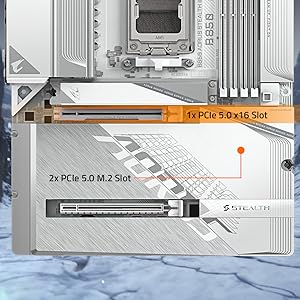
The GIGABYTE B650 AORUS Elite AX is a premium ATX motherboard designed for AMD Ryzen 7000-9000 series processors, featuring advanced 14+2+1 phase digital VRM, DDR5 memory support up to 128GB at 6666 MHz, PCIe 5.0 and PCIe 4.0 M.2 slots for next-gen storage, WiFi 6E, 2.5GbE LAN, and user-friendly BIOS flash capabilities. Backed by a 5-year warranty, it offers robust connectivity and thermal solutions tailored for high-performance gaming and professional workloads.
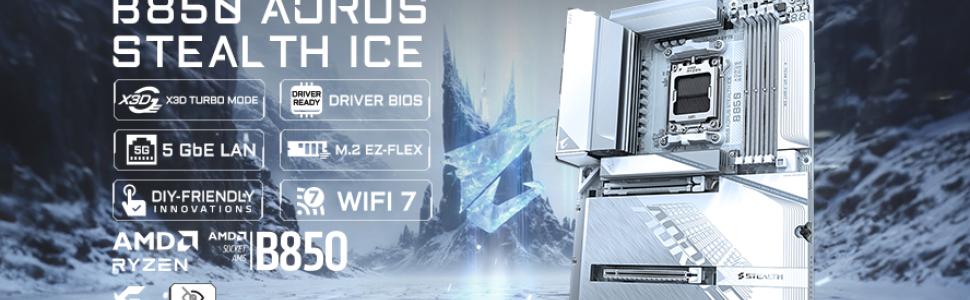
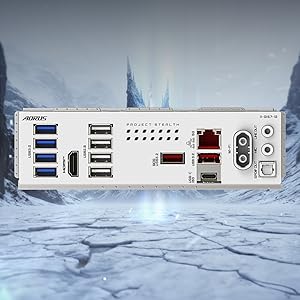
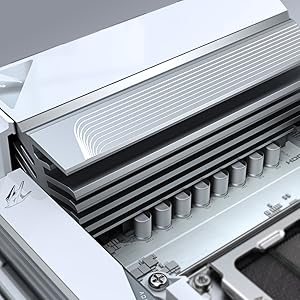

| ASIN | B0BH7GTY9C |
| Best Sellers Rank | #6 in Computer Motherboards |
| Brand | GIGABYTE |
| CPU Model | Ryzen 7 |
| Chipset Type | AMD B650 |
| Compatible Devices | Personal Computer |
| Compatible Processors | AMD Ryzen 7000 Series, AMD Ryzen 8000 Series, AMD Ryzen 9000 Series |
| Customer Reviews | 4.4 out of 5 stars 3,983 Reviews |
| Graphics Card Interface | PCI Express |
| Item Dimensions L x W x H | 10.62"L x 3.14"W x 13.18"H |
| Item Height | 3.14 inches |
| Item Type Name | Gaming Desktop Motherboard |
| Main Power Connector Type | 24-Pin |
| Manufacturer | GIGABYTE |
| Memory Clock Speed | 6666 MHz |
| Memory Slots Available | 4 |
| Memory Storage Capacity | 128 GB |
| Model Name | B650 AORUS ELITE AX |
| Model Number | B650 AORUS ELITE AX |
| Number of Ethernet Ports | 1 |
| Number of Ports | 13 |
| Platform | Windows 11 |
| Processor Socket | Socket AM5 |
| RAM Memory Technology | DDR5 |
| Ram Memory Maximum Size | 128 GB |
| System Bus Standard Supported | Serial ATA/600 |
| Total Number of HDMI Ports | 1 |
| Total PCIe Ports | 3 |
| Total SATA Ports | 4 |
| Total Usb Ports | 12 |
| UPC | 889523033623 |
| USB 2.0 | 2 |
| Unit Count | 1.0 Count |
| Warranty Description | 5 |
R**K
Awesome AM5 board with plenty of features and connectivity options
This review is for the GIGABYTE B650 AORUS Elite AX rev 1. I ordered this board because I was on an older Intel platform and I wanted to try an AMD build again. The AMD AM5 platform suits my needs since it has current modern features and is projected to have a long lifecycle and I anticipate my next upgrade to be in 5 years or so. The GIGABYTE B650 AORUS Elite AX was one the lesser expensive and full featured ATX boards with WiFi at the time of my purchase. My build includes: GIGABYTE B650 AORUS Elite AX Motherboard AMD Ryzen 7700X CPU Corsair Vengeance RGB RAM Zotac GTX 1080 AMP Edition First, my dislikes. No printed manual. As a lifelong pc builder, I rely heavily on a manual booklet for basic info such as what slots to install memory in. How to connect front panel power, reset, hdd status led etc. Where all of the headers such as USB and fans are located. Having an online manual is good but is useless if you don't have a spare computer or laptop to use while you build your computer. Thankfully I did not have to use the BIOS flashback feature because the board recognized my CPU, a Ryzen 7700X, otherwise I would have to go online, download the manual and look up the flashback instructions. For the price I do wish that the board included a higher end integrated audio chipset. Features-wise the audio chipset is the biggest disappointment. I did not like is the top most NVME slot right above the GPU slot has a really thick thermal adhesive pre-applied to the heatsink. It is so thick that it bends my NVME drive slightly - not enough to cause any issues but should be noted. One last thing I did not like is the lack of onboard BIOS post code status LED. I had this feature on my previous motherboard and found it super helpful when diagnosing problems. Now, for my likes. I like all of the features. AM5 socket, DDR5, WiFi6, PCIe 5.0, multiple NVMe slots, plenty of USB slots, and of course RGB support. The board itself is great. Build quality is awesome, no issues with build quality or materials. I did run into a few issues though. Although these issues were encountered with this motherboard, they are not Gigabyte's fault necessarily. These issues were mostly to do with the AMD platform and chipset itself. 1. The shipping BIOS "F2" version did not allow me to enable XMP memory profile. I had to flash the BIOS to the current at the time "F4" BIOS. Note that the current BIOS version as of this review is "F5a". 2. There were a lot of stability or problems with the USB chipset or bus. File transfers over USB were very slow or slower than it should be. I have USB DAC that had a lot of noise during audio playback. These issues were resolved by installing the latest chipset drivers for the B650 from AMD directly and also updating the BIOS. Here are some recommendations based on my experience with the GIGABYTE B650 AORUS Elite AX. Definitely update the BIOS. In past generations of motherboards it is only recommended to update the BIOS to fix a specific issue you've encountered. However, in modern motherboards there are so many chipsets and features that it is important to keep up to date on BIOS versions to maintain stability, performance, compatibility, and security. AMD seems to release AGESA updates (as BIOS updates) often and this is directly tied to the chipset. Also, download the chipset drivers directly from AMD because they tend to be more up to date than the motherboard manufacturers' website. To flash the bios, just download the BIOS file for your motherboard from Gigabyte's website and extract/copy the file to a USB drive. Reboot and enter the bios and choose Q-Flash. Select the BIOS, and the board will load the BIOS to memory then prompt for a reboot and apply the new BIOS. Aside from the chipset drivers, all other motherboard drivers can be downloaded and installed from Gigabyte. Ever since, updating the BIOS and AMD chipset drivers, I have had absolutely zero issues. Performance is amazing. Stability is solid. I even run a mild overclock using the AMD Ryzen Master app and doing an auto-oc. In summary, I highly recommend the GIGABYTE B650 AORUS Elite AX if you're looking for an AM5 build. The issues I've had are specific to the AMD platform and not the motherboard itself, however because of this I would not recommend the AMD platform for novice PC builders or if you are not comfortable or familiar with BIOS updates and troubleshooting driver issues.
J**A
Great purchase
was an easy install was nice and clean and runs great. Bios is easy to update. much faster than my last motherboard. easy to connect wires and great for wire management.
S**N
Great board for a great price
Very easy to install, and very peripheral friendly. Nvme drives, memory, and cpu were a breeze to install. And connectors are clearly labeled for case cables. Not to mention its a very good looking board.
R**.
Best matx motherboard for the price out there
Superb build quality as expected. Booted up right away with my 7800x3d and 2 sticks of ram. Didn’t have to install any drivers or software! Enabled PBO on cpu and XMP and no issues. Decently quickly boot time about 12 seconds. Chose this over the Asus TUF B850m Plus because it’s a little cheaper, has one more internal usb2.0 header which I use both of, and I think 1 more year of warranty. Also Gigabyte has the fastest boot times out of all the brands. Super fast and stable and very easy bios also. Bios update to new version using usb drive and Qflash was superrrr fast and easy. Perfect board for my Deepcool Ch270 mffpc vertical case (be ready to be blown away by my build pics ;) Only OCD nitpick I have is the capacitors are shiny silver; I wish they were black to blend in better and not be as pronounced with all my fan rgb lighting. That’s just me though.
C**S
Great board, software could be better.
Pros: Good motherboard. Has plenty of great features and is easy to set up. It looks great in all white builds. Cons: Gigabyte software is awful. The Rgb constantly bugs and has to be reset. Also Pc occasionally powers on/restarts due to software updates.
H**R
Review for Gigabyte B850 AORUS Elite Wifi7
Easiest computer build I ever did. Not one problem with the board while setting it up. Downloaded gcc and installed all the drivers I needed, and updated latest bios from windows without a hitch. Enabled amd expo in bios and boots every time and is stable running games. I can't find anything bad to say about it yet. Cpu Idles at 39-41C. Highest i have seen is 77C gaming. Highly recommend this board for a amd build. Here are my specs for anyone wondering about what is compatible. Ryzen 9 9900x Gigabyte B850 Aorus Elite wifi7 Be Quiet 1000w pure power 13M Gskill Trident Z5 6000 M/t cl30 F5-6000J3038F16GX2-TZ5NR Samsung 2tb 9100 pro Corsair Nautilus 360 RS ARGB Gigabyte 5070ti Gaming OC Windows 11 Home
K**R
Awesome :)
It works fantastic plus there are more USB ports than I know what to do with, haha. The only problem I had is that I'm guessing this isnt a super popular model, so trying to find videos of the ssd/cpu being put in or the motherboard itself being installed was kinda difficult. Just a warning. But 10/10 good first build starter mobo.
S**R
Nice when it boots and when the network works
I got one of the earlier versions of this board (1.0 or 1.1, not sure) and it has given me lots of problems that I'm spending too much of my time working around in my system with a 7950x3d CPU and 32 gigs of G.Skill Trident Z5 Neo 6000 mhz expo memory. The memory is on their compatibility list, as is the CPU. Nvme drive is a Samsung 980 pro. When it boots or wakes from sleep properly it is fast and very stable with no problems while it remains on. The problem is that it has many startup problems and it's always like playing a stupid game trying to get it to boot or work properly after sleep. I don't want to spend 5 minutes trying to get my computer to boot every time. Problem 1: It makes a POST beep, shows the aorus screen (or AMI screen if I disable the splash screen in BIOS) and just sits at it for about 30 seconds. Windows doesn't load and it gives no errors. Then it reboots by itself and does the same thing all over again. It does the POST loop for hours if I leave it for hours. This is especially extreme on BIOS version F8d that they released in September and the problem doesn't occur too often with BIOS version F8a, but it has other problems. The only real solution is to shut off all power to the motherboard by unplugging the power supply or at the PSU switch before trying again. Then there is about a 40% chance it might boot afterwards. Repeat until it boots. Things I've tried that don't work: turning off EXPO setting on memory, reseating CPU, reseating RAM or putting in the other two slots, reseating nvme, changing many different BIOS settings or resetting to defaults. The fact that one of the BIOS revisions works differently than the other makes me think it's a BIOS or board design flaw rather than a major issue with any other hardware in the system. Problem 2: waking from sleep doesn't properly restart components in a low power state. After a certain number of wakes it gets more and more unreliable. Sometimes it just has a black screen (maybe more common under F8a BIOS) and I have to hard power reset. Less drastic, some USB components may just no longer work after a wake up and I have to reboot again and hope it boots. Also, sometimes everything else works fine but the onboard networking no longer works and cannot be enabled until after a reboot. Sometimes putting it to sleep again and waking it again gets the networking working and sometimes it doesn't. Related to these problems to I've had to resort to using hybernate instead of sleep mode since it's more reliable for waking the machine, but it might have the first problem booting where it boot loops at the BIOS startup screen. But at least if it doesn't boot correctly, it keeps my windows state when it finally starts up. The other thing to mention is that memory training takes a *full* two minutes before showing a POST screen or giving the beep when it decides to retrain. Supposedly this is a common experience for newer motherboards with DDR5 memory, though I've never had a system this slow to POST until now. It decides to redo memory training every few weeks on its own or more often if I have to pull the power plug from the wall. So the board works great and is rock solid as long as I never turn it off or let it go to sleep, but otherwise has lots of problems. I had hope that their BIOS updates would fix some of the issues, but F8d is worse than their earlier f8a revision and there haven't been updates in months and I see they released Rev 1.2 of the board since then. I wonder why the new revision? I suspect the earlier revisions of this board have some uncorrectable issues at least with certain hardware that is supposed to be supported. It doesn't outright fail every single time, but it seems gigabyte has some QA and design issues. I would stay away from this motherboard, at least for the hardware configuration I'm using it with. This is not a great board if you want reliability starting your computer. I had hope that BIOS updates would fix the issues but I it's getting clearer that they probably can't or won't release updates to fix the issues on this version of the board. PS. I've also tried the system with two different videos cards and neither made any difference to the boot/sleep reliability problems.
Trustpilot
2 weeks ago
1 day ago



