We remain fully operational. Our teams are working around the clock to ensure your deliveries continue safely.

DOWNLOAD THE APP


Customer Services
Copyright © 2025 Desertcart Holdings Limited
DOWNLOAD THE APP




🚀 Elevate your workday with power, style, and AI smarts — the ZenBook 14 Pro OLED means business.
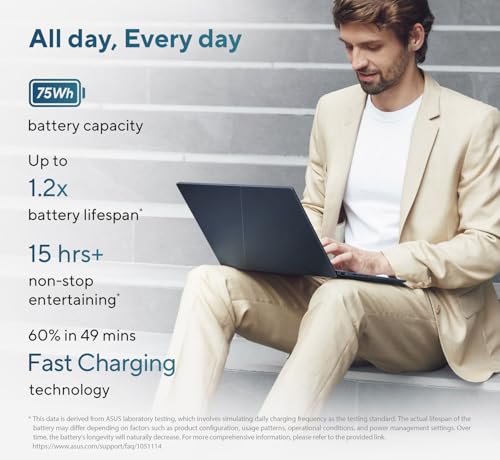
The ASUS ZenBook 14 Pro OLED Q425 is a premium ultraportable business laptop featuring a cutting-edge Intel Ultra 7 155H 16-core processor, 16GB LPDDR5X RAM, and a massive 2TB PCIe 4.0 SSD. Its 14-inch FHD+ OLED touchscreen delivers vibrant colors with 100% DCI-P3 coverage and 500 nits brightness, perfect for professionals demanding visual excellence. Designed to MIL-STD 810H military standards, it offers durability alongside a sleek, lightweight chassis. With AI-enhanced multitasking, 15-hour battery life, advanced connectivity including Wi-Fi 6E and Thunderbolt 4, plus robust security features like TPM 2.0 and an IR webcam with privacy shutter, this laptop is engineered for the modern professional on the move.


| ASIN | B0D7M5K242 |
| Are Batteries Included | Yes |
| Audio Details | Speakers |
| Average Battery Life (in hours) | 15 Hours |
| Batteries | 1 C batteries required. (included) |
| Brand | ist computers |
| Colour | Gray |
| Computer Memory Type | DDR5 RAM |
| Connectivity Type | Wi-Fi |
| Customer Reviews | 4.2 4.2 out of 5 stars (15) |
| Date First Available | 14 September 2024 |
| Form Factor | Ultra-Portable |
| Graphics Card Description | Integrated |
| Graphics Coprocessor | Arc Graphics |
| Graphics RAM Type | Shared |
| Hard Disk Description | SSD |
| Hard Drive Interface | Solid State |
| Hard Drive Size | 2 TB |
| Hardware Platform | PC |
| Included Components | 75W AC Adapter with Power Cord, ASUS ZenBook 14 OLED Laptop, User Manual |
| Item Dimensions LxWxH | 31.2 x 22 x 1.5 Centimeters |
| Item Height | 0.59 Inches |
| Item Weight | 1 kg 280 g |
| Item Width | 8.67 Inches |
| Item model number | ZenBook 14 OLED |
| Lithium Battery Energy Content | 75 Watt Hours |
| Manufacturer | ASUS |
| Maximum Memory Supported | 16 GB |
| Memory Clock Speed | 6400 MHz |
| Memory Technology | Lpddr 5 |
| Number of Lithium Ion Cells | 4 |
| Number of USB 3.0 Ports | 1 |
| Operating System | Windows 11 Pro |
| Optical Drive Type | NO |
| Power Source | AC & Battery |
| Processor Brand | Intel |
| Processor Count | 14 |
| Processor Speed | 4.8 GHz |
| Processor Type | Intel Core Ultra 7 |
| Product Dimensions | 31.24 x 22.02 x 1.5 cm; 1.28 kg |
| RAM Size | 8 GB |
| Resolution | 1920 x 1200 Pixels |
| Screen Resolution | 1920 x 1200 pixels |
| Series | ASUS Zenbook 14 |
| Standing screen display size | 14 Inches |
| Wireless Type | 802.11ax, Bluetooth |
R**U
Great computer for the price point.
U**R
Overall very happy with this Asus Zenbook OLED Q415 touchscreen business laptop, both the model and seller. Fast delivery, worked perfectly out of the box. Great small size. Nice touchscreen. We had a little problem with the sound drivers, but after some firmware updates all works fine. The AI copilot features are fun to play with. Nice screen quality. I especially like the hinge design - we had problems with Dell laptop hinges breaking, and this one looks much more durable. No app or MS Windows 11 compatibility problems (printing, MS Office, Browser, etc all work fine). Great battery life. Lightweight. Nice product.
S**R
This business version of the home edition is great. Love the amount of storage (2TB). Its size is great. I had a 15" laptop before and didn't really miss the one-inch. I still have to get used to Windows 11. So far it's not my cup of tea. Two things I don't like: 1. the glossy display. Never had one before and now I know why not. Will try a matte screen protector. 2. I would've preferred if there was one more USB Type-A port. I think I will get a dock to solve this.
J**S
This laptop is everything I wanted and expected at a very competitive price. More than satisfied.
K**T
We got this for my 5 year old for homeschooling. It's sturdy, and we like the stylus and touchscreen. But it's quite slow to 'wake up' and to open programs, and not all the apps we were hoping to use work on chromebooks. It's a good size for a child, but the keyboard seems very cramped for us adults. The 2nd camera feature above the keyboard (that allows you to take photos while it's in 'tablet' position) is a good concept, but the unit it too heavy for kids to hold for very long, so not particularly functional for smaller users. Browser windows are cut off partway on the screen, and many apps don't have the ability to expand to full screen, so you're stuck using an app the size of a 3x5 card.
Trustpilot
3 days ago
5 days ago