We remain fully operational. Our teams are working around the clock to ensure your deliveries continue safely.

DOWNLOAD THE APP


Customer Services
Copyright © 2025 Desertcart Holdings Limited
DOWNLOAD THE APP


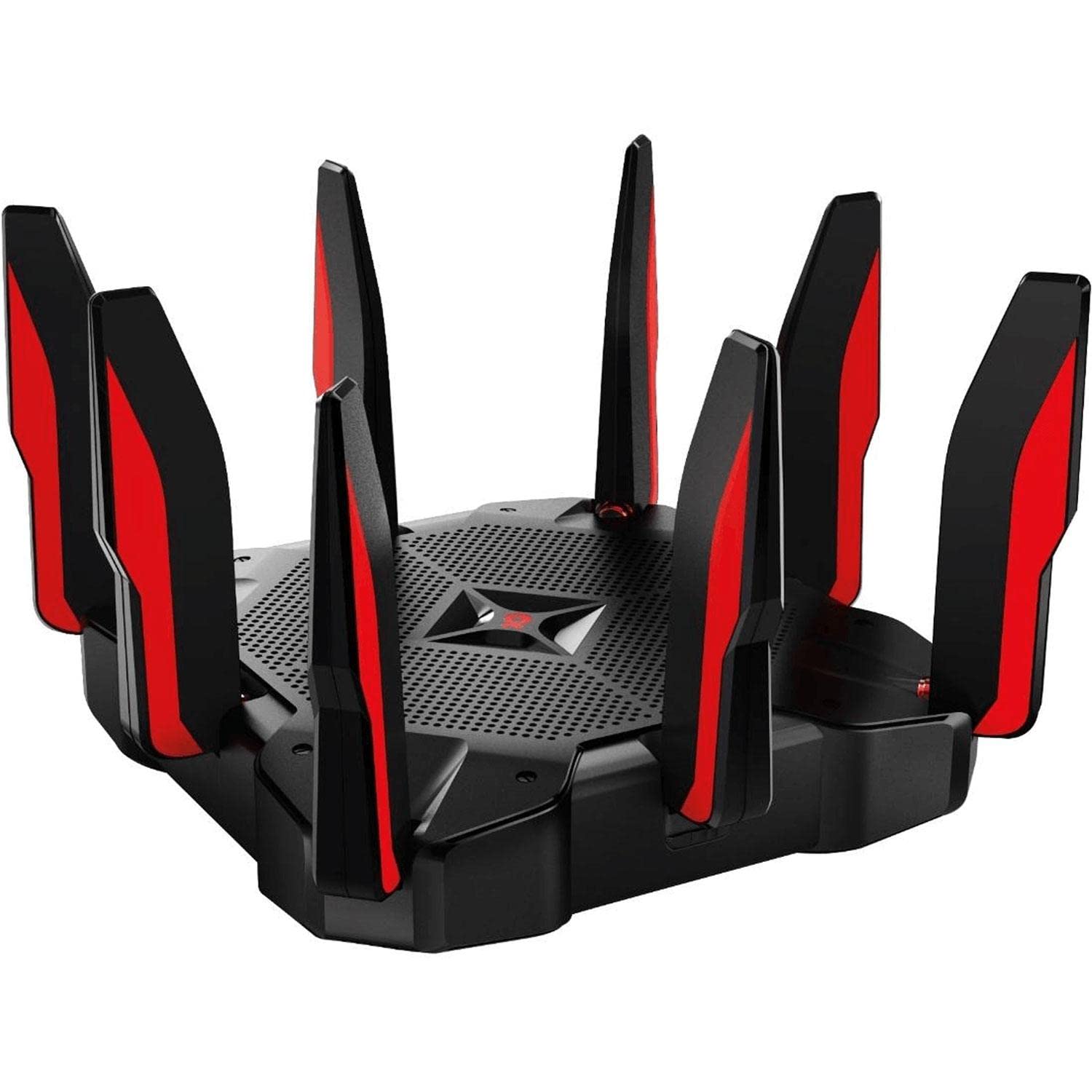


🎮 Dominate your digital domain with the ultimate tri-band gaming router!
The TP-Link Archer C5400X is a powerhouse tri-band WiFi router designed for gamers and tech-savvy professionals. Featuring a 1.8GHz quad-core 64-bit CPU, 8 Gigabit LAN ports with Link Aggregation, and AC5400 wireless speeds, it delivers ultra-fast, low-latency connections across multiple devices. Advanced MU-MIMO, Airtime Fairness, and RangeBoost technologies maximize coverage and throughput, while TP-Link HomeCare provides robust security and parental controls. Perfect for large homes and heavy network users seeking premium performance and reliability.


| ASIN | B076HRZJ66 |
| Antenna Location | Gaming, Home |
| Antenna Type | Fixed |
| Best Sellers Rank | #105,883 in Computers & Accessories ( See Top 100 in Computers & Accessories ) #2,289 in Computer Routers |
| Brand | TP-Link |
| Built-In Media | AC5400 Wireless Tri-Band MU-MIMO Gigabit Router, Ethernet Cable, Power supply unit, Quick Installation Guide |
| Color | Black/Red |
| Compatible Devices | Personal Computer |
| Connectivity Protocol | bluetooth, ethernet, wi-fi |
| Connectivity Technology | Bluetooth, Ethernet, USB, Wi-Fi |
| Control Method | App |
| Controller Type | amazon_alexa, vera |
| Coverage | 4 Bedroom Houses |
| Customer Reviews | 4.4 out of 5 stars 3,313 Reviews |
| Data Transfer Rate | 5334 Megabits Per Second |
| Frequency | 5 GHz |
| Frequency Band Class | Tri-Band |
| Global Trade Identification Number | 00845973081454 |
| Has Internet Connectivity | Yes |
| Has Security Updates | Yes |
| Is Modem Compatible | Yes |
| Item Dimensions L x W x H | 11.34"L x 11.34"W x 7.24"H |
| Item Type Name | AC5400 Wireless Wi-Fi Tri-Band Router | Broadcom Next Generation 4 Core Processor |
| Item Weight | 3 Pounds |
| LAN Port Bandwidth | 1 gigabits per second |
| Manufacturer | TP-Link |
| Maximum Upstream Data Transfer Rate | 5400 Megabits Per Second |
| Mfr Part Number | Archer C5400X |
| Model Name | Tri Band AC5400 |
| Model Number | Archer C5400X |
| Number of Antennas | 3 |
| Number of Ports | 9 |
| Operating System | Linux |
| Other Special Features of the Product | QoS, WPS |
| RAM Memory Installed | 1 GB |
| Router Firewall Security Level | High |
| Router Network Type | Tri-band |
| Security Protocol | WEP, WPA-PSK, WPA2-PSK |
| Smart Home Compatibility | Smart Home Compatible |
| Special Feature | QoS , WPS |
| UPC | 845973081454 |
| Unit Count | 1.0 Count |
| Voltage | 120240 Volts |
| Warranty Description | 2-Year Limited Warranty |
| Wireless Communication Standard | 802.11ac, 802.11n |
| Wireless Compability | 802.11ac, 802.11n |
R**S
Easy setup and great performance
I am not a network guru but had been using the TP Link 1750 with great success for many years. And my experience with TP Link has been positive. I had been thinking about upgrading as we have continued to add wired and wireless devices around the home and I was starting to notice a bit of a lag for connecting with certain devices quickly such as camera video monitoring. And also the range in our two story brick home was a bit of a challenge so I had a repeater/booster as well to get a little better signal in certain areas. Amazon had this 5400 unit at an outstanding price over the Prime days in early July so I purchased it. I was surprised at how simple it was to setup and replace my existing 1750. The interface and ease of use are much improved over the older 1750. And it has really increased our speeds on all bands by about 35 to 50% as well as reduced significantly the latency or time to get data moving. As well we are getting much better coverage and signal strength all around the home including outside on our deck and patio (an area before that was terrible). This device also has 8 Lan ports (up from 4) and that has allowed us to connect a few more gadgets direct to the network. Finally it is an awesome looking device. The large fat racing red and black antennas are really cool and the unit itself looks like an alien spacecraft. Very satisfied with the purchase and would recommend this to anyone needing the additional connectivity and thruput offered by this higher end router.
Z**S
The greatest little spaceship ever
UPDATE2: I noticed that my speeds were not what I was paying for. I was clocking at ~120Mbps, paying for 400Mbps. After a support call to the ISP, and hours of troubleshooting, I discovered that enabling QoS Device priority slams the throughput into the dirt. So, my advice, do not use QoS Device Priority if you want an individual device to have access to the full bandwidth of your service. UPDATE1: So after about 6 months, the WAN port went bad. Totally stopped communicating with the modem. Tried the WAN aggregation feature, which is supposed to turn LAN1 into an additional WAN port. The feature did not seem to work. Amazon replaced the item and all is good. This really is a great router. I recently upgraded my ISP Link to 400mbps, and decided to get a better router to go along with the upgraded service since I have so many devices on the network now. Once the ISP enable the modem, installing the AC5400 was cake. Obtained DHCP address quickly, and was immediately available at the management address for configuration. I walked through the quick setup to get online quickly. Setup was simple and quick. You can enable all of your SSID's from one convenient page. I configure the 2.4 for my smart home devices (better range, speed is not important), one 5GHz band for my streaming devices (TV, tablet, phone) and a hidden 5GHz band for gaming (when not hardwired) I have my PS4 hardwired, so I tested speeds between wireless (130Mbps) and wired (190Mbps). I am impressed with the throughput. All devices connected seamlessly during the transition (left credentials same as previous). The management interface is clean and easy to navigate. Lots of nice features between Parental Controls (although I wish there was slightly more granular control (lowest access timeout is 30min) and support for OpenVPN is interesting. You can Bind MAC's to the ARP table, and can create nice generic Firewall catergory filters. Overall I'm happy with this purchase. Hardwired PC Ookla test on a 400Mbps link got clocked at 483Mbps, so I'm not sad at all.
S**M
The perfect router
This thing is amazing. I consider myself relatively home network savvy, but definitely not the most advanced. After a few years of using my own modem/router combo instead of paying Comcast for their garbage, I decided to upgrade. Primarily because I was having network issues and couldn’t narrow down whether the issue was with the modem or router portion of my combo device. If you come away from this review with one point, let it be to NOT buy modem/router combo devices. They’re fine until they’re not, but you’re compromising performance for convenience. Anyhow, this router is amazing. Totally friendly with my Motorola modem, incredibly easy to set up using the TP Link app, and ridiculously good tri-band performance. I’ve dedicated one 5 band to gaming devices, the other 5 band to streaming and laptops, and the 2.4 band to IoT and misc. devices. Everything functions flawlessly. Devices don’t need to fight for traffic or bandwidth, my IoT speed and performance doubled, and I’m looking forward to using some of the more advanced features like setting up a SSD to be a cloud drive on the network. Is this overkill for my home network? Yes. But, I expect that I’ll be able to use this as part of my home network for long enough to see it used more meaningfully. If you understand that this thing is expensive but an absolute beast, you won’t be disappointed.
M**C
Awesome route. Easy to install.
I don'twrite review often, but for this one I will. I have 20 Mbs internet service at home, and was using 15 years old router. Lately the wifi often disconnected and slow. I was desperately need to resolve this, because it created problem with my works, my kids online school, and family entertainment. I am not a tech savy, but somehow I feel the old route was the problem. I was not sure if it will fix my wifi problem. I decided to buy this TP-Link AC5400, and now I do not have wifi problem anymore in my house. My house is two levels, about 3100 SF. With this router, there is no dead zone. Everywhere in the house, the download speed is the same strength level as it is near the router. I checked the speed it is about 22 Mbs download speed thoughout the house. The price is high, but this router is loaded with all the bells and whistle. It stabilizes the wifi connection, so I never have to reset my internet connection. The router is a bit warm during operation, I put my laptop fan under it. It was easy to install.
O**T
Overall good router but "slow" upload speed (mb/s)
Pulled this behemoth out of the box and could hear the lord of the rings music playing in my head as it looks like a crown Sauron would wear in modern times. It is a large router but it fit nicely on the top of my PC so for me it worked out just fine. Overall it was a great router in terms of coverage and ease of setup as it was almost plug and play. The biggest drawback (which I understand wont be a factor for some people) was the slow upload speed. I have gigabyte internet on fiber and my upload speed was only clocking in between 7 -15 mb/s. Yes it has QoS but this did little to help even with prioritizing my PC. I need high upload speeds as I stream on Twitch. It did however perform just fine on the download side. I was able to have 3 t.vs on streaming simultaneously (1 in 4k), my phone playing a youtube video, my kids computer gaming, and my wife's phone pulling in a youtube video all without any lag at all to any device. The range of the single was also a very good plus. While this router did not work out for me I know I am it was only due to the weak upload speeds I was receiving. I tried working with Tp Link's customer service agent (which actually wasnt an awful experience) and we were unable to find a fix because a they told me they are only trained to diagnose issues with download speeds.
K**Z
So far so good! Only time will tell...
Pros: *Very noticeable range and signal strength improvement compared to my 8 year old router (Asus RT-AC66U). *No drops on connection while watching streaming videos, youtube, surfing the web, gaming, etc. *Very easy to configure graphical user interface. You can just set it and forget it. *If you have Alexa Echo, you can use it to send specific commands to this router to change its settings. *Its tri-band and not dual band... much more versatile in accepting wireless connections. *Very easy set up also on the hardware part... just attach the antennas, plug-in the power adapter & ethernet cable, and power it on. Cons: *The TP-LINK AX11000 is just around the corner which supports the new AX wifi-6 speeds & WPA3 wifi security encryption. If you want to future proof despite the higher cost, you might want to get that instead. *It's expensive but it does use pretty good hardware (Quad-core 1.8Ghz CPU, 1GB RAM, etc.) *Lack of more gaming centered features compared to Netgear and Asus offerings. *TrendMicro antivirus & home security is only for 3 years and not lifetime. I wish there's a way to switch this to BitDefender that other router offers once the TrendMicro 3 years subscription expires. Other Thoughts: This is TP-Link's 1st gaming router and its pretty expensive. I'm a tech enthusiast and usually will get the best I can get. I was looking at the Netgear's XR700, and Asus ROG AC5300.. which looked pretty good on paper but has more negative reviews than this router so I ended up getting this one instead. I was kind of torn between getting this one or waiting for the TP-LINK AX11000 but I kind of really need the upgrade quick. But thinking about it again, I game on a wired connection and I don't really have any devices that uses the AX wifi bandwith. Even if I do end up getting devices that uses AX signal in the future, 2.4Ghz & AC 5Ghz bandwith is plenty for my current and most likely future needs. This router covers my entire house already without the need of using mesh/repeaters/extenders. Most of all, after doing massive downloads (Gigs of data - mostly Steam games), gaming, torrenting, watching 4k streaming videos, surfing the net, chatting, voip, etc... this device has did it all without breaking a sweat. It hasn't dropped any of my connections (both wired & wireless) and its been very stable. This is something rarely present on new released products that's why I'm hesitant to replace this with the new AX11000 offerings from TP-Link, Asus, or Netgear. I might end up with a defective product that is rushed released and not ready for prime time. TP Link, I usually buy Asus or Netgear products when it comes to home networking but since their top of the line atm have more bad reviews... I'm taking a chance with you guys. I hope this router last a long time. In fact, the router it replaced (Asus RT-AC66U) didn't die or anything. It's just that as my network expands and my wireless needs grows, I have to upgrade. Don't let me down! FYI: I also have this same review on N3W3GG
C**R
Great multi use router
Pros: - Fast speeds (if configured properly, you can get what you pay for speed wise) - The app is incredible - looks crazy cool - The quad core processor allows many devices to use the internet without suffering (I game, my gf watches her YouTube videos all while her dad watches Netflix.) Cons: - The second 5Ghz band doesn’t always work but in a standard household, is it really necessary? - (Updated 8/26/2020) the second 5Ghz band was not configured to show SSID - totally my fault! After using this router for some time, we love it! Everyone can use WiFi seamlessly without any interruption, and that’s with a household that has at least 4 devices per person (16 total). Overall, it’s an amazing router. Configure it correctly to your liking and maintain weekly, you’ll enjoy it!
R**H
Horrible router, TP-Link refuses to honor warranty
Update 08-08-2022 Horrible C/S. TP-Link refuses to back their 2 year warranty. The router is not even one (1) year old and the wifi stopped working. TP-Link sent a link to update firmware whick has made the router un-usable. I have been in contact with the rude TP-Link C/S, they are doing everything they can to not cover this expensive router. I have used Tp-Link equipment for almost 20 years, no more. Since TP-Link has refused to honor their warning, they are rated ZERO in my book. I have had to buy another router to get my house and all wifi devices back working. So stay away from TP-Link, they will not honor their own word/warranty. Update 08-03-2022. Horrible C/S. It takes them three days to respond, then it is a scripted reply. It had nothing to do with the issue (wifi radios not working. Must be within four feet of the router to connect to the wifi). They wanted me to update the firmware, which I did. Now the wifi does not work, even at four feet. I even did a factory reset, still no good. The email also included a line stating If I did not get back with them within ONE (1) day, they would consider the issue closed, which they did. I work in healthcare starting a 6am. So I have an expensive paperweight. The four eithernet ports still work, just this is a WiFi router that does not work. I will not be purchasing any more tp-link junk. Not a good router. Way to expensive for what it is and what you get. 1) NO instructions, NO setup or quick setup. You MUST go to the internet to get information on how to set this thing up. If you do not have internet until this router is setup and working, Well you are out of luck. Wi-Fi basically stopped working. When you do find information, there is NO pdf manual that you could download. It is a webpage manual with links and links and links and links to other pages of information on the router. I want a pdf I can download and read through. 2) Only one status light. It uses a color code (need to look up the colors meanings on the internet). So you really do not know what is going on with this router. I like knowing which ethernet ports are active, If the wifi is active (being used) and is it connected to the internet. Well, you cannot tell what is going on with this router. It did have decent throughput when I first received it. Update: Now four (4) months forget it. At about three months old, I started having issues with wifi, kept disconnecting. Note, my PC is in a different room, yet total distant between my computer and router is less than five (5) feet. Now (4 months old) the total distance for the wifi is about two (2) feet. Yes, you read that correctly, I said only two (2) feet. This is on all three wifi connections 1- 2G and both 5G. To test this: I placed my phone in airplane mode, turn on wifi. Could only connect right around the two foot mark. Did the same thing with my Samsung tablet and iPad, same results. Laptop, connected at around two and a half feet. Tried with my PC, had to add a longer ethernet cable and extension cord for power to the router. I had to set the router within two feet of my PC wifi antenna to connect. The ethernet ports still work. I want and need this router for the 5G wifi. TV could be on one 5G connection and PC could be on the other. Before someone ask, yes I have wifi smart devices, some where around two hundred of them. No, they do not run/connect through this router. I use an old (15+ year old) cheap $30 router for the smart devices since they can only connect to 2G and not 5G. The cheap router is centralized in the house. Where as the TP-Link AC5400 router is on the east end, near the PC and TV. The most wifi connections at any one time is three, tablet, Fire Stick and/or PC. A router this expensive should last longer than 3 to 4 months. I will connect TP and see if they are willing do anything. If not, I did purchase the extended warranty. What ever happens, I will be down this router for mostly several months. So, no I cannot and will not recommend this over priced router.
Trustpilot
1 day ago
1 month ago