Desert Online General Trading LLC
Dubai, United Arab Emirates
Desert Online General Trading LLC
Dubai, United Arab Emirates


🌟 Light up your brand with AZERONE’s powerhouse LED matrix—where visibility meets durability!
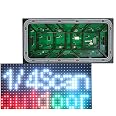
The AZERONE P10 LED Matrix Outdoor Screen is a high-performance, full-color RGB display module designed for outdoor use. Featuring a 320x160mm panel with 32x16 pixels, it delivers vibrant visuals with 16.7 million colors and brightness exceeding 7500 nits. Its wide 120° horizontal viewing angle and IP65 waterproof rating ensure clear, durable performance in any weather. With easy pixel-level maintenance and compatibility with multiple video signals, it’s the ideal solution for dynamic signage and advertising that demands attention.
| Color | RGB-full color |
| Brand | AZERONE |
| Voltage | 5 Volts |
| Are Batteries Included | No |
| Manufacturer | AZERONE |
| UPC | 608119340194 |
| Item Weight | 15.9 ounces |
| Product Dimensions | 12.6 x 6.3 x 0.57 inches |
| Item model number | P10-32*16-3535-4S |
| Is Discontinued By Manufacturer | No |
| Size | P10-320*160mm |
| Manufacturer Part Number | P10-OD |
A**T
Excellent LED Display, Great Price
The media could not be loaded. This is a great LED display, perfect for my purposes. I will be using it in a holiday light-show display, and hope to buy more at some point.I had been looking for P10 LED matrices for a while, but I could only find P5 and smaller displays, which would not be suitable for viewing from a larger distance. I think this seller is the only one that sells P10 matrices on Amazon with full RGB color!Unfortunately, it did take some work to figure out how to properly control this display, as apparently there are a lot of different configurations that manufacturers use. I tried a bunch of different Arduino libraries to control this display with an Arduino Uno or Mega, but the arrangement of the rows seemed a little funky. Then I discovered a library called PxMatrix (by 2dom on Github), which allows ESP8266 boards to control LED matrices like this one. Using an ESP8266 board means the display can be driven over WiFi as well! This library gives direct access to choose which display configuration you have, to ensure everything displays properly, and I was successfully able to find a setting which works.Here are the settings you will need to use in PxMatrix to control this specific P10 display (or at least the one I received from this seller):Row Pattern (used in display.begin): 4Mux Pattern: STRAIGHTScan Pattern: ZAGGIZ
Trustpilot
2 months ago
2 months ago
2 weeks ago
2 months ago