Desert Online General Trading LLC
Dubai, United Arab Emirates
Desert Online General Trading LLC
Dubai, United Arab Emirates


🖨️ Elevate your workspace with effortless, vibrant printing—because your ideas deserve to be seen.
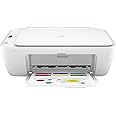
The HP 5AR83B DeskJet 2710 is a compact all-in-one inkjet printer designed for wireless printing, scanning, and copying. It supports high-resolution color prints up to 4800x1200 dpi and integrates seamlessly with smartphones via the HP Smart app. Included is a 2-month trial of HP Instant Ink for convenient, cost-saving ink delivery. Ideal for professionals seeking reliable, easy-to-use printing solutions with minimal setup.
| Product dimensions | 8D x 18W x 14H millimetres |
| Controller type | iOS |
| Maximum Supported Paper Size | 8.5 x 11 inch |
| Power consumption | 1.7 Watts |
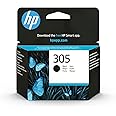
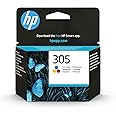
| Included components | HP DeskJet 2710 All-in-One printer; HP 305 Setup Black Cartridge; HP 305 Setup Tri-color Cartridge; Regulatory flyer; Setup guide; Reference guide; Power cord. |
| Print media | Envelopes, Paper (plain) |
| Scanner type | Flatbed |
| Max input sheet capacity | 60 |
| Max copy speed (black and white) | 7.5 ppm |
| Compatible devices | Smartphones |
| Maximum colour print resolution | 4800x1200 dpi |
| Sheet size | 89 x 127 to 215 x 279 |
| Maximum black and white print resolution | 1200 dpi |
| Warranty type | limited warranty |
| Colour depth | 24 bpp |
| Dual-sided printing | No |
| Maximum copies per run | 25 |
| Wattage | 50 watts |
| Batteries | 1 A batteries required. |
| Item model number | 5AR83B |
| Manufacturer | HP |
| Form Factor | All-in-One |
| Standing screen display size | 75 |
| Computer Memory Type | DDR DRAM |
| Connectivity Type | Wi-Fi |
| Number of USB 2.0 Ports | 1 |
| Hardware Platform | Smartphone |
| Operating System | Windows |
| Are Batteries Included | No |
| Lithium Battery Energy Content | 2.6 Watt Hours |
| Lithium Battery Packaging | Batteries contained in equipment |
| Lithium Battery Weight | 0.5 Milligrams |
| Number Of Lithium Ion Cells | 7 |
| Number of Lithium Metal Cells | 7 |
| Item Weight | 3.42 kg |
| Guaranteed software updates until | unknown |
J**O
A Surprisingly good printer
You know, to be honest, I was a little surprised by this printer. I just wanted a cheap printer but didn’t want HP because experience has left me with glitches, devices not working as they should, expensive computers and printers giving up just after the guarantee ran out. I remember one expensive HP printer would have cost more to repair than replace. However, this is nothing new, I haven’t discovered America. I tend to go for cheap printers now and try to check the price of ink before I buy it. Perhaps I had just been unlucky.I suppose what I am saying is that I was prejudice against HP (I only bought it because it was the cheapest at the time.) So far it is a great printer, everything installed like a dream and the WIFI just did itself, I had to press a couple of things, that’s all. In contrast, a Canon printer I have needed me to study to PhD level in rocket science to set up the WIFI.The HP sits in a room upstairs and I can print from my laptop downstairs without any problem. Has my faith been restored in HP, perhaps I will decide that when the guarantee expires, but I actually like it, good quality, reasonably quick, and works when you want it to? You know what I mean, all the printers I have owned seemed to have their own mind and agenda and didn’t want to do the simple tasks they were designed to perform.Talking of forgiveness, Amazon messed up my next day delivery, which I needed to happen. They sent it to the wrong depot or something. Anyway, they refunded me the cost of the special delivery and were very apologetic and over-polite. I can’t hold a simple mistake against them can I?Cheers
M**I
Amazing for that price, easiest set up imaginable.
I have no idea what people have been doing to find it difficult, but this has been the easiest set up process ever. Amazing delivery speed from Amazon, then app installed, WiFi connected in no time, inserted paper and ink cartridges and have printed already ten documents I need to look at until in 3 days from now. Frankly I wonder what some of the reviewers are describing here - is it really the HP DeskJet 2710 All-in-One Printer ? Because I can only say this printer is perfect for that price and simply fantastic and easy to use. I'd be happy to be contacted to verify that I am absolutely happy with this printer. And believe me, I have written loads of bad reviews when an item is rubbish.
S**Y
Good printer, but has a few quirks
Printer works well - when it works. Setup was a bit glitchy; couldn't do it from my phone (setup just hanged) so I tried from my Mac and it worked perfectly. After that, I could use it from my phone no problem. When it prints, the quality is pretty good and it's not too slow. Scanning is pretty great, actually - far easier than I expected it to be.For me the main issue is, if you don't use it to print for a few days, my devices can't seem to connect without me first unplugging the power cord and plugging it back in. Simply turning the printer won't work; my devices can see it, but the print job hangs. Reinserting the power lead then trying to print again works 100%. It's not a dealbreaker for me as I don't print too often, but it's worth bearing in mind. This is being used with an M1 Mac Mini running MacOS 11 (Big Sur).
J**E
Does the job, and has a decent print. Worth the money.
I got this almost exclusively for photo printing, and occasional documents, and it does a good job.It is easy to set up, though on one PC it was a bit painful mostly down to my network setup, but super easy on the phone.The scanner is not bad either.The ink subscription is good. I got my first refill pretty quickly, and well before I had run out. Though I will rarely hit my monthly print subscription of 50 pages.I would not hesitate to recommend this, partly because of the quality of print, but also because of the ink subscription that means I never need to worry about ink again, for only 2 quid a month. I like the simple life.
J**S
A pain in the proverbial to set up, and then stops working after 8 months.
Bought this printer solely to print some funeral orders of service.First of all as others have said you need the smartphone app to even set this up to connect to your wifi, presumably so HP in the usual fashion can try to shove their products down your throat. Fine, whatever, set that up. Had to watch a few youtube tutorials on how to do it but got there after about an hour of faff.Go to print and it is fine, print quality is just 'ok'. It is also a very slow printer but fine whatever i have time. Print off what i need and turn it off.8 months later i need to print something else, so go to turn it on and print but the paper does not draw into the tray to print....Tried increasing the amount of paper in the tray, reducing the amount of paper in the tray, nothing works. The roller just spins infinitely trying to draw paper in. I manage to get it to print once when i actually push the paper into the feeder by hand, and then it half prints with a lot of black missing. That could be due to ink cartridge being depleted but only 15 or so double sided funeral services had been printed. Seems strange that the black would only last for 30 or so prints.Regardless of the ink, the printer simply now will not draw paper in making it a giant paperweight. A giant paperweight that was an absolute slog to set up in the first place seemingly due to HP's weird marketing obsession.Would not recommend. Trying to get a return/refund as we speak but given its been 8 months i doubt it will be accepted, so essentially have been ripped off. Avoid HP printers like the plague.
Trustpilot
2 weeks ago
2 months ago
1 month ago
2 months ago