Desert Online General Trading LLC
Dubai, United Arab Emirates
Desert Online General Trading LLC
Dubai, United Arab Emirates


🎨 Elevate Your Game with Style!
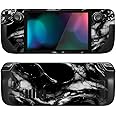
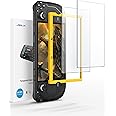
The PlayVital Full Set Protective Skin Decal for Steam Deck offers a custom-designed vinyl cover that perfectly fits both the LCD and OLED models. With precise cutting for optimal functionality, it ensures no interference with gameplay while providing superior protection against scratches and bumps. Made from high-quality adhesive vinyl, it guarantees a smooth touch and easy installation, allowing gamers to personalize their devices effortlessly.

E**8
Great value and brings a nice colour to the Steam Deck look and feel
The Steam Deck is the best device I have bought for 2022, but this review is not about the Steam Deck, but I like it so much that I have kitted out the Deck with a number of accessories.One of which is this skin for it. The seller provides many different style of skins for the Deck, for me, this colourful one looks the best in my opinion. The surprise (as many have said) is that this comes with 2 skins. I have only needed to use 1 and spent a nice 30 minutes to apply this carefully with a credit card (to smooth the bubbles out) and made sure the holes align properly with the Deck.There is a textured surface which gives the Deck a nicer feel which it also covers the touchpads to make the front look consistent with the rest of the body. Note, that the skin does not affect the touchpads at all.Some have made comments about some part of the skin has started peeling, there are certain parts that have started, but these are those folded parts where there are little adhesion to the Deck, e.g. the top and bottom of the screen. I simply use the hair dryer and the credit card to push them down again. They are not visibly or peeling bad, I just have OCD to make sure it is as smooth as possible.I have bought a body case for the Deck anyway, this provides and additional protection AND to prevent the skin sides from catching, which would cause the peeling problem more prominent.I would say this is a really good value skin for the Deck, I have looked at other brands like EasySkinz, etc, but they don't have as many designs and much more expensive.If you have time on hand and have patience to do this properly, your Steam Deck would look amazing after it is done (as shown in my pictures).
B**E
Excellent
Very beautiful stickers but a bit hard to attach by myself. It’s cover almost every part of the device.
N**6
Great skin!
Very happy with this skin. It’s the first time I applied a skin to anything and it was very easy to do. The skin adhered very well to the Steam Deck but was also easy to pull up if I wanted to adjust it. The price was also great considering you’re given 2 of the skin in the pack in case something goes wrong.The skin fits perfectly, I specifically got this one because I didn’t want to cover the grips at the sides and I love how it looks.
P**L
Not Great But Serviceable
I picked this up for my son's Steam Deck. I can't help but compare it to the Dbrand skin I've applied to my own Steam Deck. The quality difference is apparent. This one feels more like a sticker than a skin. It does the job and is nice and colourful. It will protect from a few knocks here and there and make the deck stand out. I would say it is not pleasant to install however. The "cutouts" need to be punched out before application. By far the worst area for this is the speaker grill on both sides which require you to punch out tiny pieces that inevitably stick to the rear adhesive as you do so. If you take your time it is doable but it is fiddly and unnecessary. I think if I was choosing again I'd probably shell out for the more premium option as it is not that much more pricey, installs easier and looks better.
P**0
Image resolution worse than item listing shows
Resolution of skin was both pixelated and blurry. Eye-catchingly bad.Other reviews discuss the skins inability to fit LCD models and sticking/peeling issues. I cannot speak to this as it didn't make it out of the packaging.As a budget option, it's not worth it if it looks poor quality and doesn't fit.Returned for refund without opening packaging.Love the idea and style, but the quality isn't there.
D**E
Rubbish
Poor quality in every way. The sticker itself is ridiculously thick. the edges are also quite rough so scratch against your hands while playing. The included cleaning kit was dried out so the alcohol wipes were useless. The sticker also fails to do the one job it has, STICK! .on the thinnest parts it doesn't stick enough resulting in it lifting off. But that may also be because it doesn't actually fit correctly. with the ones I received, the top strip above the screen was too long, the bottom too short. using a hairdryer helped stretch it but left parts of the case showing.
C**L
Very nice.
Easy to apply, looks great!
A**R
Not bad
Nice pattern and very easy to stick down however the cutouts didn't seem to quite line between the front and back piece however it came as a pack of two and I managed to piece it together and has lasted no problem for over 2 months of frequent use
F**N
It has a second skin incase you screw up
There's a YouTube video to follow to how to put it on, it's super easy to follow, however my precut sections didn't rip on the back as easily. It is however very forgiving and applied easily. Absolutely love it
A**A
Make Your Deck Look Perdy
Amazing skin and goes with my set up and the Wave designs I got on my Switch & PS5. Now my Steam Deck feels more personalized to me.You'll need to be patient as it takes some time to align and put on. Recommend some tweezers.I only have one minor complaint and that is the speaker holes aren't all cut out when you put the skin on the Deck. But most of them are. Also, a few screw hole cutouts on the back aren't accounted for. So keep that in mind if you want to upgrade storage or get into the Deck.You are given two sets so if you rip the first or it wears you got back up.Overall though its easy to apply and re-stick if you need to adjust it. Easy to remove and no residue. High quality and a good price as well!
M**.
Great price. Perfect fit.
I can only assume whoever gave this 3 stars before me didn't have time or patience to put a skin on a Steam Deck. If you don't have at least a moderate level of patience, and lets say crafting skill, just buy a case. These arent the easiest thing to put on, but its not the products problem. It is the shape of the Steam deck itself. Use a light touch, and on areas that bend in make sure you get intonthe deapest part of the crease first. Keep a tool handy to help press the skin into those areas, the eraser end of pencil works ok.Anyway as for the skin itself, its perfectly cut and costs between 50 and 65% less then the big namesl guys. Couldnt be happier. Also you get 2 incase you screw it up.
S**Y
Good quality for the price.
Skin looks good and sharp for the price. I am impressed. The skin doesn’t fully wrap on the top side of the Steamdeck but with a case it looks phenomenal.
S**H
Not perfect but im happy with the resuls
1. Use a sharpie on the borders to remove the white paper cut out. Makes it look seemless and the vinyl protecting layer makes it easy to remove the sharpie markings. (Used it for around the buttons, screen, speaker holes, touchpads.)2. Make sure to remove the speaker hole removed with a toothpick. And all other cut out first.3. Put the top and bottom of the screen vinyl as close as possible to the screen.4. No wrap for where you put your hands so I made some. Took a lot of time but got it working. I used a razor to cut off the excess vinyl. The corner of the razor followed the seems of the top and bottom cover easily.5. I didnt have a hair dryer so I used the stove on HI at about 6 inches off the plate for the top of the screen. Had to use a lighter for the bottom of the screen and heat it part that was lifted really close and have contact with the vinyl. Heated until i see the vinyl move a little by itself and instantly pressed on it.. this may leave fingerprint but barely noticeable.5. Used a razor blade on the right and left side of the screen to have nice straight edges.Overall: You got 2 sets and did it on the first try while taking my time to apply it neatly. Use scissors instead of just ripping paper. The holes he made in the video are not precuts in the paper causing issues. So i ignored that and just aligned it.
Trustpilot
5 days ago
1 week ago